Prototype vs MVP: How to Choose and Build the Right Test
Understand the key differences between a prototype and an MVP. Learn how to choose the right approach to validate your product ideas effectively.
Development
KreanteAugust 11, 20262 months ago
A prototype tests whether your design makes sense. An MVP tests whether your product is worth building at all. Those are different questions, and mixing them up is one of the most expensive mistakes a product team can make.
The one-line rule: Run a prototype when you need to validate a design or user flow. Run an MVP when you need to validate market demand and willingness to pay.
Here’s how the two tools break down in practice:
Prototype: Non-functional or semi-functional artifact, shown to designers and internal stakeholders, answers “Is this the right design?” Fidelity ranges from a paper sketch to a polished Figma mock.
MVP: Functional, deployable product with core features, shipped to real end users, answers “Do people actually want this and will they pay for it?”
What you learn: A prototype surfaces friction in navigation and comprehension. An MVP surfaces activation, retention, and revenue signals.
When to pick first: If technical risk is high, run a Proof of Concept (PoC) before either. If the technology is proven and the product is customer-facing, go prototype first, then MVP. If you already know the user problem cold and the tech is solid, you can skip straight to an MVP.
Key Takeaways
A prototype reduces design risk; an MVP reduces market risk. Choosing the wrong one wastes weeks and produces data you can’t act on.
Point
Details
Prototype tests design, not demand
Use a prototype to validate UX flows and comprehension before writing production code.
MVP requires production quality
“Minimum” means minimum scope, not minimum engineering — analytics and support are non-negotiable.
PoC comes before both when tech is uncertain
Run a PoC first if the technical feasibility of your core feature is unproven.
Sequence follows risk type
The standard order is PoC (technical risk) → prototype (design risk) → MVP (market risk).
Kreante covers the full path
Kreante handles discovery, prototype sprints, MVP builds, and post-launch support as a single engagement.
What is a prototype, and what does it actually test?
A prototype is an artifact built to test a design hypothesis, not to ship to customers. It answers the question “Is this the right design?” for the team building the product, not for the market. According to UXPin, prototypes are aimed at internal stakeholders and designers, while MVPs are aimed at real end users.
The fidelity spectrum
Prototypes exist on a spectrum from rough to refined, and the right fidelity depends on what you’re trying to learn:
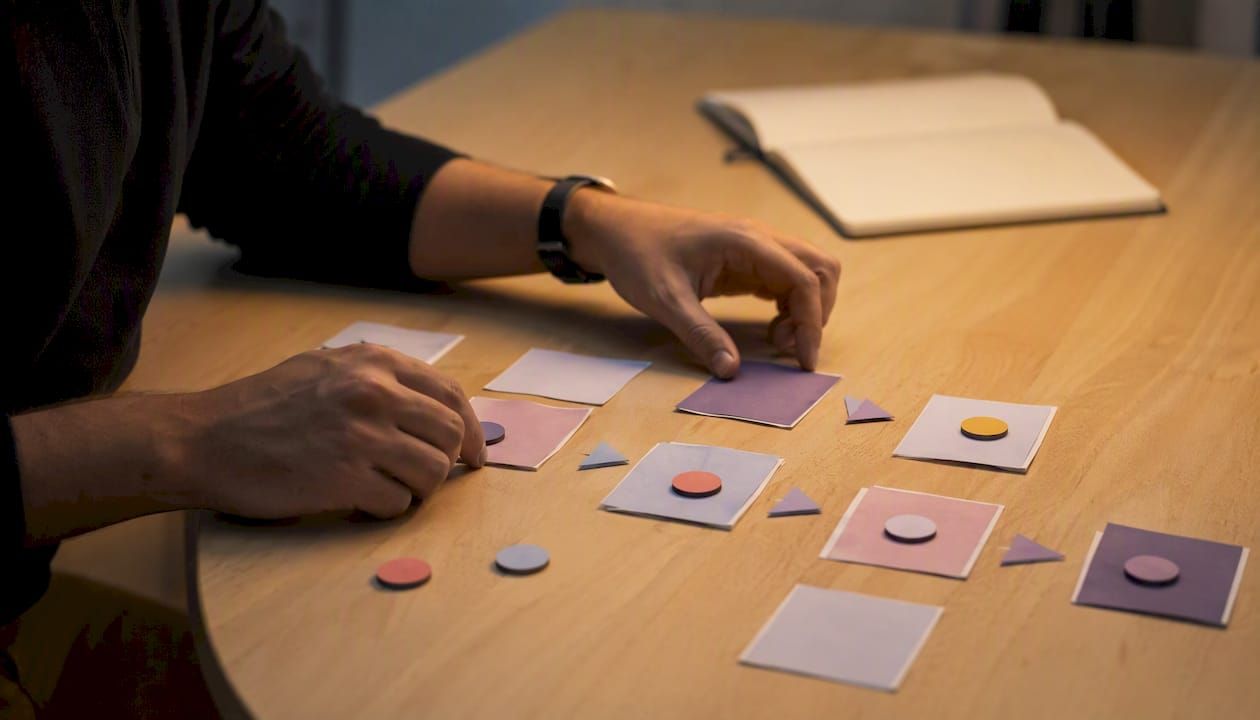
Low-fidelity (paper sketches, whiteboard flows): Takes hours to make. Use these when you’re still debating the core user journey. Cheap to throw away.
Medium-fidelity (clickable wireframes in Figma or InVision): Takes days. Good for testing navigation logic and information architecture without getting distracted by visual polish.
High-fidelity (interactive Figma prototypes, Framer builds): Takes one to two weeks. Use these when you need to test comprehension of specific UI elements or get stakeholder sign-off before engineering starts.
Bubble’s comparison of prototypes and MVPs notes that prototypes range from low-fidelity sketches to high-fidelity interactive simulations and are consistently faster and cheaper than MVPs, which require engineering, data handling, and deployment.
Common tools and when to pick each
Figma dominates for clickable wireframes and high-fidelity mocks. InVision works well for teams that want to layer interactions on top of static designs. Framer suits teams that want near-production-quality animations without writing production code. For quick stakeholder demos, even a no-code mockup tool can do the job.
What a prototype cannot do: It cannot tell you whether users will pay, whether they’ll come back, or whether your core value proposition resonates in the real world. Those are MVP questions.
Pro Tip: *Before running a usability session, write one hypothesis per test: “We believe users will find the checkout flow confusing at step 3.” Then recruit 5–8 participants and watch where they hesitate.
What makes a real MVP — and why “minimum” doesn’t mean sloppy
An MVP is a functional, deployable product that tests market demand and core value with real users. The word “minimum” describes the scope, not the engineering quality. Jacob Kaplan-Moss makes this point directly: an MVP must be functional, measurable, and viable, and it requires production considerations like analytics and support infrastructure.
That distinction matters in practice. A broken sign-up flow, a missing error state, or an app that crashes on the second session doesn’t give you market signal. It gives you noise about your execution quality.
What an MVP must include
A reliable, end-to-end user flow for the core use case
Basic analytics (activation event, retention tracking, at minimum)
Error handling and a support channel (even just an email address)
A clear conversion or engagement event you can measure
The metrics that tell you if an MVP is working
The metrics that matter depend on your business model, but the core signals are:
Activation: Did the user complete the core action the product is built around?
Retention: Did they come back within 7 or 30 days?
Conversion: Did they sign up, pay, or invite someone else?
Engagement: How often and how deeply are they using the core feature?
Hostinger’s breakdown of prototype vs MVP frames it clearly: an MVP is a working product with core features used to validate market demand and adoption, not a rough demo dressed up as a product.
A “shabby MVP” that breaks user trust is worse than no MVP at all. If users bounce because the product feels unfinished, you’ve learned nothing about market demand. You’ve only learned that people don’t like broken software.
How do prototype vs MVP compare across the dimensions that matter?
Dimension
Prototype
MVP
Primary question
Is this the right design?
Do users want this and will they pay?
Primary audience
Designers, PMs, stakeholders
Real end users, early adopters
Fidelity
Low to high (non-functional to interactive)
Full production fidelity
Technical readiness
Not required
Required (stable, deployable)
Production status
Not deployable
Deployable and supported
Success metrics
Task completion, comprehension, friction points
Activation, retention, conversion, revenue
Typical timeline
Days to 2 weeks
4 weeks (scope-dependent)
Typical cost driver
Designer time, prototyping tools
Engineering, infrastructure, integrations
A few points that trip teams up:
Calling a PoC an MVP. A PoC proves technical feasibility to the internal team. It has no users. Shipping a PoC to customers and calling it an MVP skips the entire validation step.
Treating a prototype as a market test. Prototype users know they’re looking at a mock. Their behavior in a usability session does not predict real-world adoption.
Skipping the comparison table logic. If you can’t name the specific metric you’ll measure after launch, you’re not ready to build an MVP yet.
The quick decision rule from this table: if you don’t have a deployable product with analytics, you don’t have an MVP.
Prototype vs MVP vs PoC: how the three tools fit together
A Proof of Concept (PoC) answers one question: “Can this technically work?” It’s an internal test, usually a quick spike or throwaway build, run when the team faces genuine technical uncertainty. Per the PM.Kibitkin analysis of PoC vs MVP, a PoC answers “Can this work?” while an MVP answers “Is this necessary — do users actually want it?”
The three tools serve three different risk types:
PoC: Reduces technical risk. Run it when you’re integrating a novel API, building on an unproven stack, or attempting a machine-learning feature with uncertain accuracy.
Prototype: Reduces design risk. Run it when the technology is proven but you’re unsure how users will navigate the product or understand the value proposition.
MVP: Reduces market risk. Run it when you’ve validated the design and the tech, and you need real adoption data.
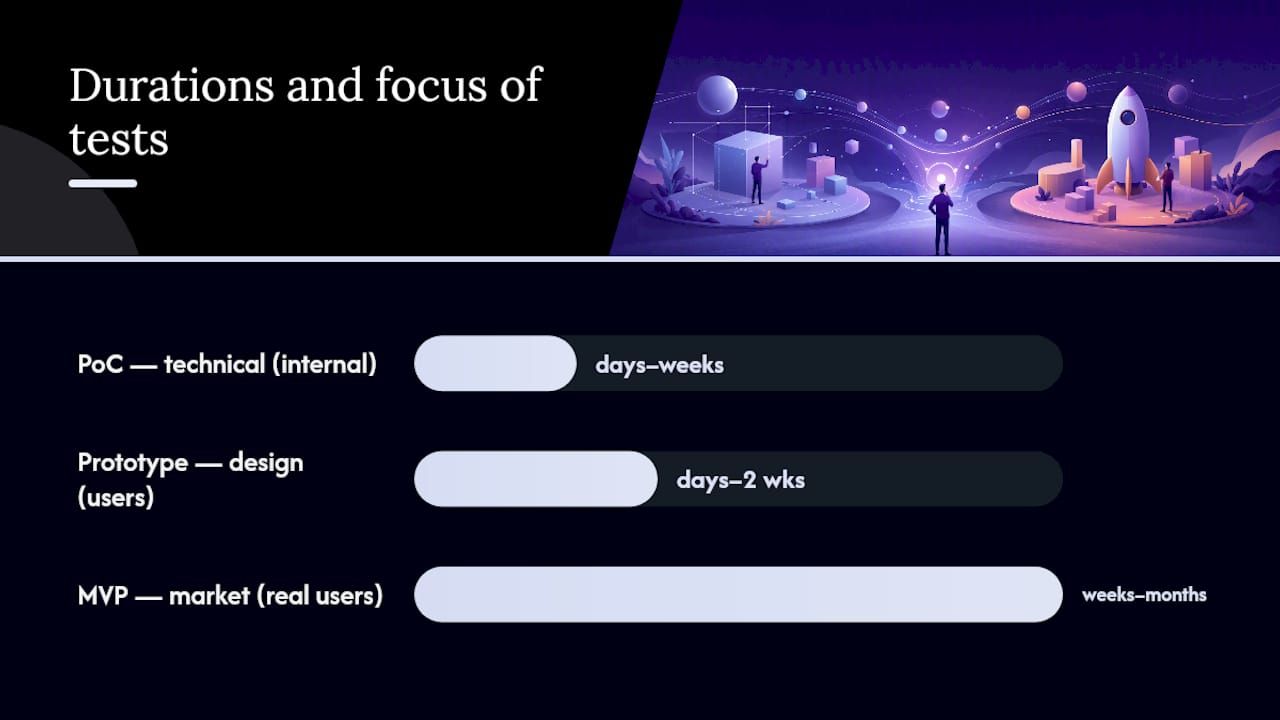
The standard sequence when all three risks exist: PoC first (days to weeks), then prototype (days to 2 weeks), then MVP (weeks to months). Skip steps only when you have strong evidence that the corresponding risk is already resolved.
Pro Tip:You don’t always need all three. If you’re building a standard SaaS workflow on a proven stack for a market you know well, skip the PoC entirely. The sequence is a risk-management tool, not a mandatory process.
Two scenarios that show the sequence in action
Scenario A — Novel AI integration: A startup wants to build a document-parsing tool using a large language model. Technical feasibility is uncertain. They run a PoC (two weeks, internal) to confirm accuracy thresholds, then build a clickable prototype to validate the UX, then ship an MVP to 50 beta users.
Scenario B — Marketplace for a known category: A founder wants to build a local services marketplace. The tech stack is standard. They skip the PoC, run a high-fidelity prototype to validate the booking flow, then launch an MVP with a small paid-ads budget to test conversion.
How to decide: a practical checklist for prototype or MVP
Work through these questions in order. The first “no” tells you where to stop and what to build next.
Is the core technology proven for your use case? No → run a PoC first.
Do you know the primary user problem with confidence? No → run user interviews, then a prototype.
Have you validated the core user flow with real people? No → build a prototype and run usability tests.
Can you build a stable, end-to-end product flow right now? No → you’re not ready for an MVP.
Do you have a plan to measure activation and retention? No → set up analytics before you launch.
Do you have a support channel and a plan for post-launch issues? No → add one before you call it an MVP.
If you answered yes to all six, build the MVP.
Red flags that mean you’re not ready for an MVP:
The user problem is still a hypothesis with no qualitative validation
The tech stack has unresolved unknowns (novel integrations, unproven accuracy)
No analytics plan exists
No one owns post-launch support
The “MVP” is actually a prototype with a payment button bolted on
Pro Tip:Scope discipline is the hardest part. Write down the single core action your MVP must enable, then cut every feature that doesn’t directly support that action. If a feature is “nice to have,” it’s not in the MVP.
Real examples: how prototypes and MVPs look in practice
The most instructive MVP examples come from products that stripped the idea down to its riskiest assumption and tested only that.
The lesson from the best-known MVPs: They didn’t build the full product. They built the smallest possible test of the most uncertain assumption.
Landing-page MVP (demand test): Dropbox’s original MVP was a demo video, not a product. The video described the product and drove sign-ups. The metric was email conversions. The lesson: if you can test demand before writing a line of production code, do it. Product School’s breakdown of MVP archetypes covers this pattern in detail.
Concierge MVP (value delivery test): Airbnb’s founders manually photographed apartments and managed bookings themselves before building any automation. The metric was repeat bookings. The lesson: manual delivery of the core value proposition is faster and cheaper than automating something users might not want.
Clickable prototype (UX validation): A fintech team building a complex onboarding flow ran a high-fidelity Figma prototype with 8 users before writing any backend code. They discovered that step 4 of the flow caused 6 out of 8 users to abandon. They redesigned it in two days. The lesson: a prototype session that catches a fatal UX flaw before engineering starts pays for itself immediately.
PoC for a novel integration: A logistics company wanted to add real-time route optimization using a third-party ML API. Before designing anything, they ran a two-week PoC to confirm the API’s accuracy met their threshold. It didn’t. They switched providers before a single design sprint. The lesson: PoC first when the technical risk is real.
Pro Tip:For landing-page MVPs, pair the sign-up form with a short post-signup survey asking “What problem were you hoping this would solve?” The qualitative answers will tell you more than the conversion rate alone.
How to build a prototype vs an MVP: steps, tools, and timelines
Building a prototype
Define your hypothesis. Write one sentence: “We believe users will struggle to find X because of Y.”
Sketch the core flows. Paper or whiteboard first, even for 20 minutes. Catch structural problems before you open a design tool.
Build wireframes. Use Figma for clickable wireframes. Keep visual design minimal at this stage.
Add interactivity. Link screens in Figma or InVision to simulate the user journey.
Run 5–10 usability sessions. Recruit users who match your target profile. Use a think-aloud protocol. Record sessions.
Iterate. Fix the top 3 friction points, then decide whether to test again or move to MVP.
Design tools like Figma and InVision make prototypes fast and inexpensive, but the value comes from pairing them with a clear hypothesis, not from the tool itself.
For teams exploring how UX validation connects to longer-term organic growth, enhancing user experience for SEO is worth reading alongside your prototype findings.
Building an MVP
Define the core value hypothesis. “We believe [user type] will [do X] because [reason].” This is your north-star metric.
Scope to the minimum. List every feature you want. Cut everything that doesn’t directly enable the core action.
Choose your stack. No-code tools (Webflow, Glide, WeWeb) work well for simple workflows and can cut weeks off the timeline. No-code stacks accelerate MVP launches for simple workflows but increase technical debt for complex, scalable systems, so choose based on your long-term architecture needs. Kreante’s guide to building fast apps with no-code covers the Glide approach in detail.
Build the core flow end-to-end. One complete, stable user journey before adding anything else.
Instrument analytics. At minimum: activation event, session tracking, and a conversion event.
Launch to early adopters. A small, targeted group gives cleaner signal than a broad launch.
Measure, then decide. Two weeks of data on activation and retention tells you whether to iterate, pivot, or scale.
For MVPs built on no-code stacks, QA testing practices become especially important since no-code tools can hide edge cases that only surface under real user load.
Timeline and cost ranges
Low-fidelity prototypes take days. High-fidelity interactive prototypes typically take one to two weeks. MVPs range from four weeks (simple no-code workflow) to twelve weeks or more for custom-coded products with integrations, payment systems, or security requirements. PoC and low-fidelity prototypes can take days to weeks; high-fidelity prototypes and MVPs typically take weeks to months depending on scope and stack choice.
Pro Tip:The biggest MVP cost driver is almost never the core feature. It’s the surrounding infrastructure: authentication, error handling, email notifications, and analytics. Budget for those explicitly or they’ll blow your timeline.
How Kreante runs prototypes and MVPs for clients
Kreante’s process follows a structured sequence that mirrors the risk-reduction logic above: discovery and technical scoping first, then a prototype sprint, then MVP build, then launch support and iteration.
What separates a well-run agency engagement from a DIY build: The discovery phase catches the assumptions that would have cost weeks of rework later. Most teams skip it because it feels slow. It isn’t.
The agency process in brief:
Discovery and scoping: Map the user problem, define the core hypothesis, identify technical risks, and decide whether a PoC is needed before design starts.
Prototype sprint: Build a clickable prototype (typically Figma), run usability sessions, and validate the core flow before a line of production code is written.
MVP build: Scope to the minimum viable feature set, choose the right stack (no-code, low-code, or custom), build end-to-end, instrument analytics, and QA before launch.
Launch support and iteration: Post-launch monitoring, bug fixes, and a first iteration cycle based on real user data.
Kreante has delivered more than 265 projects across 35 countries, covering everything from SaaS platforms and marketplaces to AI-integrated tools. Projects like Meetern illustrate the prototype-to-MVP progression for consumer-facing products, while Decathlon shows what production-readiness looks like at enterprise scale.
When to bring in an agency: If you lack in-house development skills, face a tight timeline, need production-grade infrastructure from day one, or are integrating AI features with uncertain accuracy, an agency engagement typically pays for itself in avoided rework. DIY makes sense when the team has the skills, the scope is genuinely minimal, and speed-to-market is not the primary constraint.
Common mistakes product teams make with prototypes and MVPs
Most mistakes fall into a small number of patterns, and most of them are avoidable.
Calling a PoC an MVP. A PoC has no real users and no market signal. Shipping it to customers and measuring adoption gives you nothing useful.
Polishing a prototype and shipping it as an MVP. A high-fidelity Figma prototype is not a product. It has no backend, no error handling, and no analytics. Teams that skip the build step and ship a prototype are measuring user reactions to a demo, not to a product.
Skipping analytics. An MVP without activation and retention tracking is a product launch, not a validation experiment. You can’t learn from data you didn’t collect.
No support plan. Real users hit real bugs. An MVP with no support channel destroys trust faster than any UX flaw.
Scope creep before launch. Every feature added to an MVP before launch is a feature that delays the moment you get real data. The cost of waiting is always higher than the cost of shipping something minimal.
Corrective actions: Before calling anything an MVP-ready, run through this checklist: end-to-end flow works without errors, analytics fire on the core activation event, a support email or chat exists, and at least one person owns post-launch monitoring.
Pro Tip:Measure user behavior, not user opinions. Survey responses tell you what users say they’ll do. Activation and retention data tells you what they actually do. Build your MVP success criteria around behavior metrics, not satisfaction scores.
When we’d recommend prototype, PoC, or MVP
The right tool depends on where the uncertainty lives, and that changes by context.
For teams entering a new market with an idea that hasn’t been tested with real users, a prototype is almost always the right first move. The risk is design and comprehension, not technology. A two-week prototype sprint with 8 usability sessions will surface more actionable insight than three months of internal debate.
For teams building on novel technology — a new AI model, an untested API, a hardware integration — the PoC comes first, no exceptions. We’ve seen teams spend eight weeks building a beautiful product on a technical foundation that couldn’t deliver the core promise. A two-week PoC would have caught it.
For teams with a validated user problem and a proven tech stack, the MVP is the right move, but only if the analytics and support infrastructure are in place before launch. A timeline or regulatory constraint (a compliance deadline, a competitive window) can push teams to compress the prototype phase. When that happens, we recommend running at least five usability sessions on the core flow, even informally, before shipping. Five sessions take two days and catch the problems that would otherwise show up as churn in week one.
One caveat worth naming: enterprise integrations change the calculus. When an MVP must connect to a legacy system, a payment processor, or a regulated data source, the “minimum” in MVP gets larger. Budget for that complexity explicitly rather than discovering it mid-build.
Kreante builds prototypes and MVPs that move fast without cutting corners
If the decision checklist above pointed you toward an MVP or a prototype sprint and you don’t have the in-house team to execute it, Kreante’s web and mobile app development services are built for exactly this stage. The engagement starts with a scoping call, not a lengthy proposal process, so you get a clear scope and timeline within days, not weeks.
For products that need AI features — automation, data intelligence, custom agents — Kreante’s AI solutions development team handles the PoC and MVP build as a single engagement, so you’re not managing two separate vendors for the technical feasibility test and the product build. The team has shipped more than 265 projects across 35 countries, with proprietary code, post-launch support, and a quality guarantee on every delivery. To scope your prototype or MVP, start with a discovery call.
Sources
These sources were selected for practical depth, product-management perspective, and design authority. Each one goes beyond surface-level definitions and gives teams something they can apply directly.
A note on sourcing: The most useful references here are the ones written by practitioners, not by vendors selling a tool. Prioritize the ones that give you decision frameworks over the ones that give you feature lists.
Pro Tip:Read Jacob Kaplan-Moss’s piece on demos, prototypes, and MVPs before your next planning session. It’s short, opinionated, and will save you from the most common scoping mistake teams make.
FAQ
No. A prototype is typically non-functional and used to validate design and usability with stakeholders. An MVP is a functional, deployable product used to validate market demand and adoption with real users.
A PoC tests technical feasibility internally. A prototype tests design and user flows with stakeholders. An MVP tests market demand and core value with real end users. Each one reduces a different type of risk.
Run a PoC first when the core technology is unproven — for example, when integrating a novel AI model, an untested API, or a hardware component. If the tech is standard and proven, skip the PoC and go straight to a prototype or MVP.
No. An MVP is a functional product with production-grade stability, analytics, and a support channel. A prototype is a design artifact used for usability testing. Treating an MVP as a “polished prototype” is one of the most common and costly mistakes product teams make.


 Development