AI for SMBs: Turn One Workflow Into Revenue in 6–12 Weeks
Outcome first AI playbook for SMBs: use a 5-criteria scoring rubric, run a 4-week before and 4-week after task audit, and pilot in 6–12 weeks to prove ROI.
For AI to matter to your business, it has to move a number: revenue, margin, or hours saved. That means picking one measurable workflow, running a short pilot with baseline logging, and scaling only what proves itself. Everything else is a demo.
TL;DR:
AI initiatives should focus on single measurable workflows with high frequency, clear unit economics, and minimal integration complexity to prove value effectively. Successful pilot measurement requires four weeks of baseline logging before deployment and four weeks afterward, tracking time, frequency, person, and task specifics. Off-the-shelf AI tools are faster and cheaper initially, but custom builds may justify higher costs when workflows are proprietary, complex, or involve sensitive data. Leaders must set clear baselines, define accountability, and establish decision gates at 30 and 90 days to prevent pilot failures driven by process and leadership gaps. Data governance basics, including protecting sensitive customer information and avoiding bias, are essential in SMB AI projects to prevent liability and ensure fairness.
Kreante
Turn AI Into a Measurable Result
Kreante helps companies find where AI pays off, train their teams, and build systems that improve revenue, margin, or hours saved.
AI for SBMs works when it attaches to a workflow you can measure before and after. Most small and medium-sized businesses have already tried some form of it. Far fewer can point to a dollar figure or an hour count that changed because of it. A Fortune summary of small-business AI adoption found that fewer than 1 in 5 small businesses actually integrate AI well across their operations, even though interest and trial usage run high.
The gap sits between using a tool and embedding it in a process you track. Here’s where AI for small businesses tends to produce a clean, attributable result:
Lead qualification — an AI agent scores inbound leads so sales reps spend time on the ones likely to close, measured by conversion rate per rep hour.
Appointment booking — automated scheduling cuts no-shows and admin time, measured in minutes saved per booking.
Quoting and estimating — AI drafts a first-pass quote from job specs, measured in turnaround time and win rate.
Document processing — invoices, intake forms, or claims get read and routed automatically, measured in cost per document processed.
Outreach and follow-up — AI drafts and sequences emails or texts, measured in reply rate and pipeline generated.
The QuickBooks AI Impact Report, a survey of 34,000 small businesses, found that 77% use AI regularly and 41% reported revenue increases. But the same reporting flagged vague measurement practices behind those numbers. Usage is not proof. Proof requires a metric attached to a workflow before you ever touch a model.
How to Pick the Highest-Impact AI Use Case for Your Business
Not every workflow deserves a pilot. Score candidates on five criteria before committing a single hour:
Frequency — does this task happen daily or weekly, or once a quarter? High frequency compounds even small time savings.
Unit economics — what does one occurrence cost in labor or missed revenue right now?
Measurability — can you count outputs (quotes sent, leads scored, tickets closed) without building new reporting?
Integration complexity — does it plug into tools you already run, or does it require rebuilding your stack?
Data sensitivity — does the task touch customer financial or health data that raises governance risk?
Score each candidate 1 to 5 on every criterion. A lead-qualification workflow that runs 200 times a month, costs a rep 15 minutes per lead, and pulls data from your existing CRM might score a 22 out of 25. A custom pricing-optimization engine that touches sensitive contract data and needs new infrastructure might score a 12. Pick the higher score for your pilot, not the more exciting idea.
Pro Tip:Weight “hours freed” candidates higher if you already know where you’d redeploy that time. Saved hours that just evaporate into slack time don’t move revenue. Saved hours redirected into outbound sales or client retention do.
Proving AI ROI: The Audit Any SBM Can Run
You don’t need a data science team to prove AI moved a number. You need a before-and-after task log, kept for four weeks before you deploy anything and four weeks after, recorded by the person actually doing the task. Track the same four fields every time:
Field
What to record
Task name
The specific action (e.g., “qualify inbound lead”)
Time per occurrence
Minutes spent, logged by the task owner
Frequency
How many times it happened that week
Person
Who performed it, to control for skill variance
Once you have both logs, calculate ROI with a handful of KPIs practitioners actually use for AI ROI on small business tools:
Hours saved × hourly rate — the baseline dollar value of freed time.
Revenue attributable to AI — deals or sales that trace directly to an AI-touched step.
Cost per qualified output — dollars spent per lead, quote, or ticket the AI produced or processed.
Conversion lift — the change in close rate or response rate between the two periods.
Run the post-implementation log for a minimum of four weeks and, where volume is low, extend it until you’ve logged at least 30 occurrences of the task. Fewer than that and a single unusual week skews the whole number. The most common trap is measuring right after launch, when users are still slow and unfamiliar with the tool. Wait past the learning curve before you trust the data.
Pilot to Scale: A 6-to-12 Week Playbook
A working pilot doesn’t need a committee. It needs a clear owner, a short timeline, and a decision gate at the end. Here’s a pragmatic sequence:
Weeks 1 to 2: Discovery. Pick the single workflow from your scoring rubric, assign an owner, and start the pre-implementation task log.
Weeks 3 to 5: Prototype. Build or configure the smallest version of the solution that could plausibly work. A working prototype in weeks, not months, is realistic for a scoped workflow.
Weeks 6 to 9: Measure. Run the AI-assisted process live, keep the post-implementation log running, and train the team on the new step as they go.
Weeks 10 to 12: Decide. Compare the two logs against your KPIs. Hit your target (say, a 20% time reduction or a measurable conversion lift) and you scale. Miss it and you either iterate once or kill it.
The task owner records metrics, not IT and not the founder. That keeps the data honest and keeps the workflow’s actual user invested in whether it works.
Build vs. Buy: When a Custom AI System Earns Its Cost
Off-the-shelf AI tools and low-code platforms win on speed and lower upfront cost. You can be live in days, and a monthly subscription beats a development invoice every time on paper. But subscription pricing hides real costs elsewhere:
Integration work to connect the tool to your CRM, accounting software, or scheduling system.
Data preparation and cleanup before the tool can produce reliable output.
Training time for staff who now have to learn a new step in their workflow.
Ongoing maintenance as the vendor changes features out from under you.
A custom build makes sense once your workflow is proprietary enough, or complex enough, that no off-the-shelf tool fits it without heavy customization. That’s especially true when the data involved is sensitive, or when the workflow itself is a competitive differentiator you don’t want running on a vendor’s roadmap. Assembling automations with low-code platforms works well for a pilot. A permanent, high-volume workflow tied to your margin usually justifies owning the code outright.
Pro Tip:If you’re renting five different subscriptions to patch together one workflow, add up the annual cost before assuming “buy” is cheaper than “build.” The math flips more often than founders expect.
What an Outcome-First AI Partner Actually Delivers
An experienced AI partner has delivered hundreds of projects across multiple countries, working through three connected offerings: consulting to map where AI actually pays off, coaching so the capability stays with your team, and build work for the agents, apps, and automations that produce the result.
A typical engagement starts with a scoring exercise close to the rubric above, moves to a working prototype in weeks rather than months, and hands you an ROI roadmap ranking initiatives by expected return. You own the code outright when the build is done, and support continues after launch instead of stopping at the invoice. That structure matches the outcome-first approach BizTech Magazine recommends for resource-constrained SMBs: pick a targeted use case, protect the data, and pilot against a measurable KPI before scaling.
Data Governance, Ethics, and Compliance for Small Business AI
Running AI on customer or financial data changes your risk profile even at small scale. The core rule: separate what’s shareable from what’s confidential before any data touches a public model. Feeding customer financial records, health information, or proprietary pricing into a general-purpose AI tool without checking its data-retention policy can expose you to liability you didn’t have a week earlier.
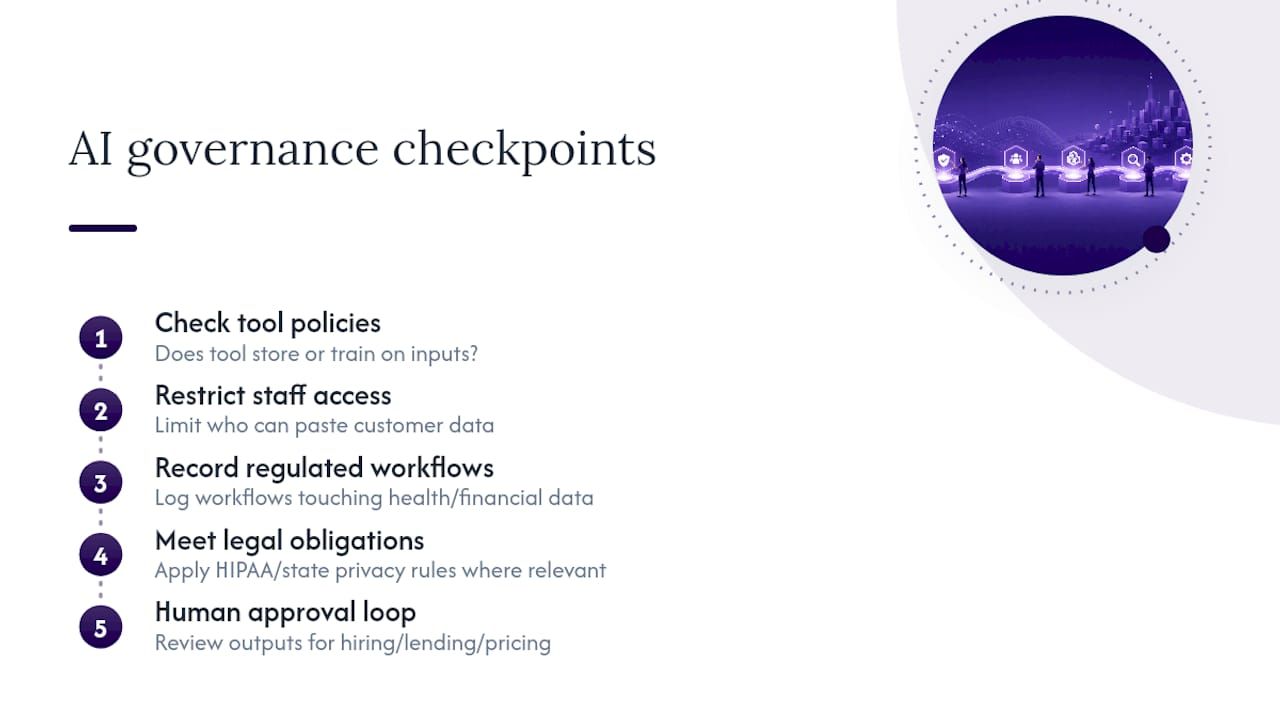
Practical governance for an SMB doesn’t require a compliance department. It requires a short list of rules everyone follows: know which tools store or train on your inputs, restrict which staff can paste customer data into external tools, and keep a record of which workflows touch regulated information (health, financial, or otherwise). If your industry carries specific regulatory obligations, whether that’s HIPAA for health data or state-level privacy law for consumer information, those obligations apply the same way to an AI-assisted process as they do to a manual one. Automating a task never exempts you from the rule that governed it before.
Bias and accuracy checks matter too, particularly for anything touching hiring, lending, or pricing decisions, where an AI system trained on skewed historical data can quietly repeat old discrimination at new speed. The fix isn’t avoiding AI in those areas. It’s reviewing outputs on a schedule and keeping a human in the approval loop for decisions that affect people’s livelihoods.
None of this needs to slow down a pilot. It needs to be a checklist item in week one, not a retrofit after something goes wrong.
Author perspective: leadership traps and a CEO checklist
The most common failure mode isn’t a bad model. It’s a founder who never set a baseline, so nobody can prove anything worked, and a team that never got trained, so adoption dies with the one employee who understood the tool. Forbes reporting ties AI pilot failure to leadership and process maturity, not the technology.
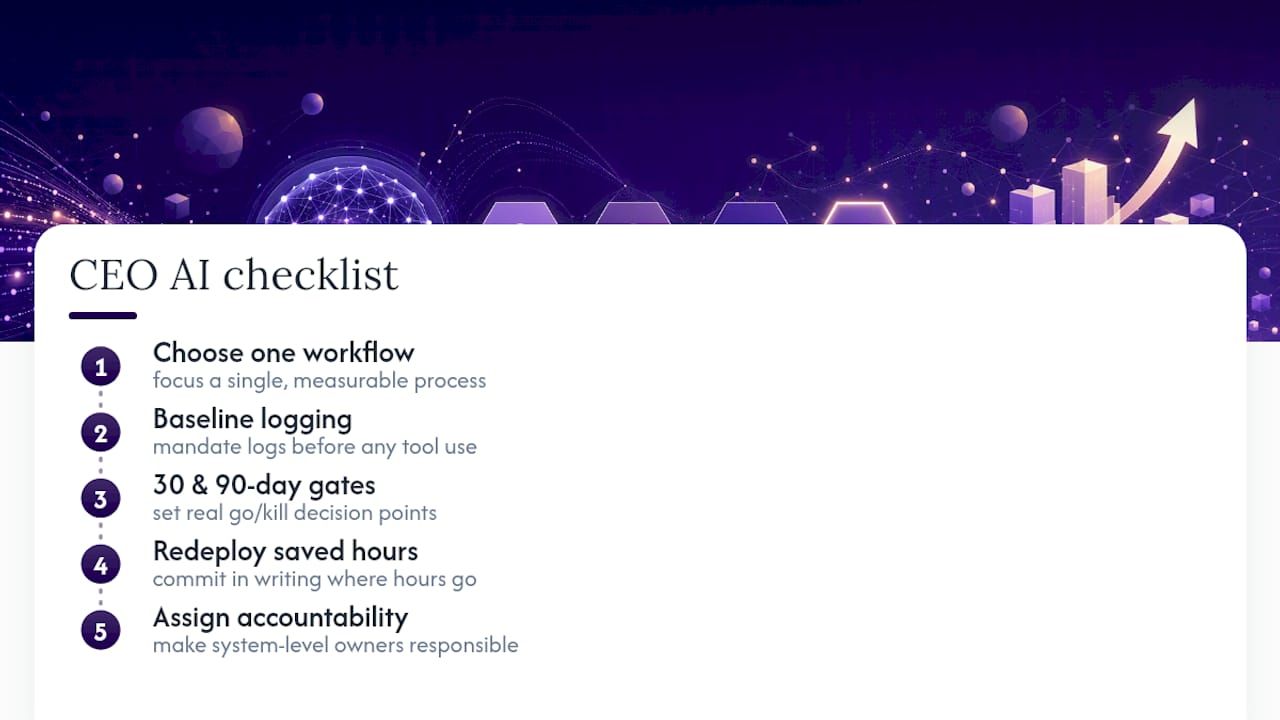
Run this before you approve any AI initiative: pick one workflow. Mandate baseline logging before anyone touches a new tool. Set 30 and 90 day gates with a real go/kill decision. Commit, in writing, to where saved hours get redeployed. Accountability is the whole system.
— Jorge Del Carpio
Getting Measurable AI Results Without Betting the Business
The typical approach is to work in the order most SMBs actually need: consulting first to find where AI pays off and build a roadmap ranked by return, coaching so your team runs AI-native instead of depending on a vendor, and build work when you’re ready for agents, automations, or custom software that replaces the tools you’re overpaying for.
A first call typically covers your current workflows, which ones score highest on frequency and measurability, and what a working prototype could look like within weeks rather than quarters. You keep ownership of whatever gets built, and support continues after launch. If you’ve already got a workflow in mind that’s costing you hours or leads every week, that’s the right place to start a conversation with Kreante’s AI consulting team about scoping a pilot and putting a number on the return.
Start with hours saved multiplied by hourly rate on one workflow, since it’s the easiest metric to log accurately without new reporting infrastructure.
Run four weeks of baseline logging before deployment and four weeks after, then extend the post-implementation log until you’ve logged at least 30 occurrences of the task.
Off-the-shelf tools win on speed and upfront cost for simple, common workflows; a custom build pays off once the workflow is complex, proprietary, or tied directly to your margin.
Yes. Kreante works through consulting to find high-return use cases, coaching to train your team, and build work to deliver the actual agents or automations.
Leadership and process gaps, not the technology itself, account for most failed pilots, largely due to missing baselines and no training or adoption plan.


 Insights & Tips