
 Tools
ToolsCustomer Support Automation: A Practical Guide for Leaders
Unlock efficiency with customer support automation. Reduce costs, enhance response times, and improve service quality with our practical guide.
JorgeAugust 16, 2026Read the article
Discover how document processing automation can streamline your operations, enhance accuracy, and deliver a prototype in just weeks.

Document processing automation, better known as Intelligent Document Processing (IDP), uses OCR, natural language processing, and machine learning together to read documents, understand what’s in them, and trigger the next action without a person typing data into a system. That last part is the whole point: extraction alone isn’t automation. If you’re weighing this for your operation, the fastest sane path is a two-to-four week process audit followed by a working prototype on your own documents, not a six-month platform rollout.
Two numbers should anchor your expectations. Recent benchmarking of leading AI-powered OCR and layout models found accuracy above 85% on complex documents that include tables, math, and multi-column layouts. Throughput tells a similar story on the infrastructure side: running OCR models on an optimized inference runtime instead of a generic API call can push processing into the hundreds of images per second.
Document processing automation succeeds when a narrow pilot on real documents proves out accuracy and cycle-time gains before any wider rollout commitment.
| Point | Details |
|---|---|
| IDP means understanding, not just OCR | Modern systems extract structure and intent, enabling automated actions like PO matching. |
| Accuracy benchmarks set expectations | Leading models exceed 85% accuracy on complex, multi-column documents. |
| Human review belongs at validation | Flagging exceptions is faster and cheaper than manual re-keying at the extraction stage. |
| Hosting choice affects throughput | Self-hosted GPU runtimes outperform standard API calls on volume-sensitive pipelines. |
| Start with an audit, not a platform buy | Kreante’s approach runs audit, prototype, and integration before full deployment. |
Legacy OCR reads characters. Intelligent Document Processing reads the document. That distinction sounds academic until you watch the two systems handle the same invoice: OCR hands you a wall of extracted text, while IDP hands you a structured record, “vendor: Acme Corp, amount: $4,230, due date: March 14,” ready to post. IDP layers NLP and machine learning on top of raw text extraction so the system understands field relationships, document type, and intent, not just character shapes.
That gap between extraction and understanding is where the automation actually lives. AWS describes the shift as moving from character recognition to comprehension, where large language models interpret structure and context well enough for downstream systems to act on the output automatically.
IDP typically handles:
Automated PO matching is the clearest example of the difference in action: OCR gives you the invoice text, IDP checks it against your purchase order and flags the mismatch before a human ever opens the file.
Every credible IDP implementation runs through the same five stages, whether the vendor calls it something fancier or not.
Pro Tip: Put your human reviewers at the validation stage, not the extraction stage. Reviewing a flagged exception takes seconds; re-keying a whole document takes minutes. That single placement decision often determines whether a pilot’s ROI case holds up.
Integration points matter more than most teams expect going in. A pipeline that extracts perfectly but dumps output into a CSV nobody watches isn’t automation, it’s a very expensive OCR tool.
Every IDP system, regardless of vendor, is built from the same handful of components, just assembled differently.
Accuracy expectations should be grounded in real benchmarks, not vendor marketing decks. Independent testing of leading layout-aware OCR models found 85.7% accuracy on documents with tables, math, and multi-column layouts, a meaningfully harder test than a clean single-column invoice.
Hosting choice affects performance directly. Cloud APIs get you running fastest; self-hosted GPU inference through a runtime like NVIDIA TensorRT delivers materially higher throughput once volume justifies the infrastructure.
The benefits of document processing automation only matter if you can measure them. Reduced manual entry hours, faster invoice-to-payment cycles, and fewer keying errors are the headline gains, but the KPI you track during a pilot should be narrower and more specific than “efficiency.”
Track these five metrics from week one:
| KPI | Why it matters |
|---|---|
| Accuracy rate | Directly drives how much manual correction work survives automation. |
| Cycle time | Shortens the gap between receiving a document and acting on it. |
| Cost per document | The clearest line item for calculating payback period. |
| Exception rate | Shows where your pilot needs tuning before scaling. |
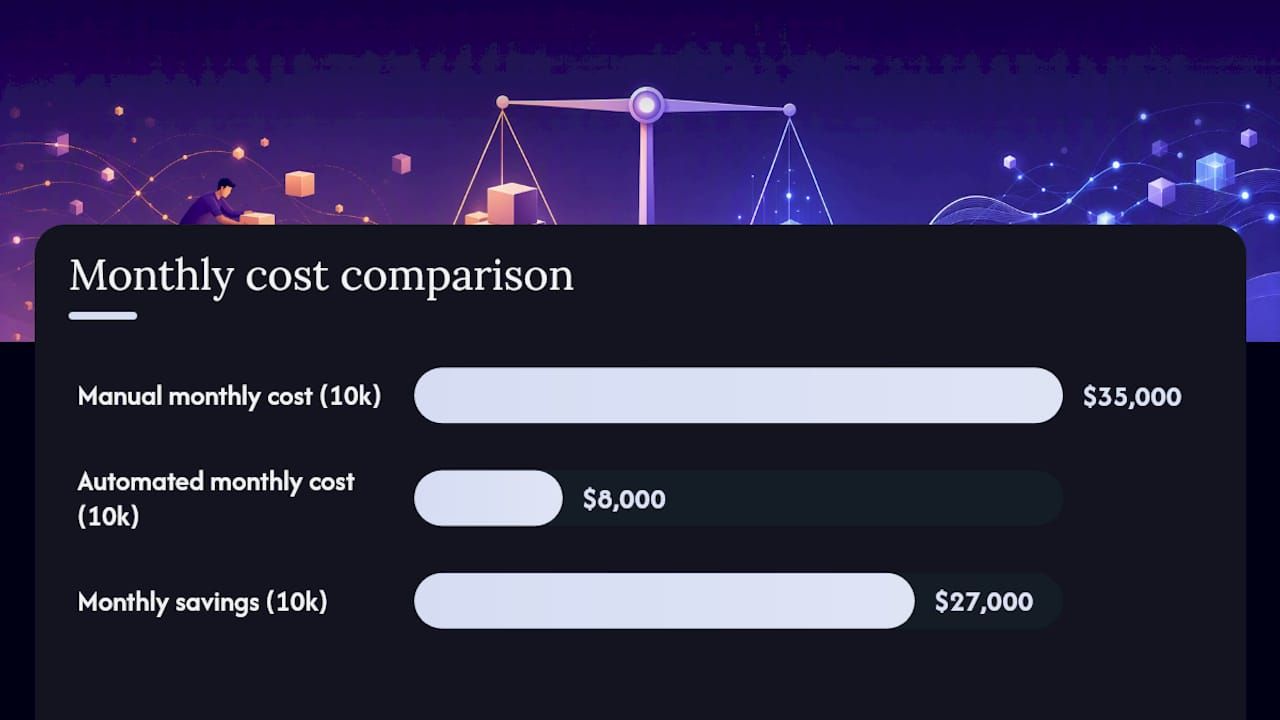
A simple payback model: if manual invoice processing costs your team $3.50 per document in labor and automation drops that to $0.80, a 10,000-invoice monthly volume saves roughly $27,000 a month before subtracting platform or partner costs. That’s the kind of number a finance leader signs off on without a debate.
Not every document type deserves automation attention on day one. These are the use cases where organizations consistently see the fastest payback.
Language and format variability deserves a mention most vendors gloss over: a document set that mixes scanned handwritten forms with clean digital PDFs across three languages behaves very differently than a single-format, single-language pilot. Test your actual document mix before committing to accuracy claims.
Where you host the pipeline shapes cost, speed, and data control more than most teams anticipate at the proposal stage.
Cloud-hosted APIs get you to a working pilot fastest, with minimal infrastructure investment. Self-hosted GPU runtimes trade that speed for lower latency and stronger data control, particularly relevant when documents contain sensitive personal or financial data that can’t leave your environment. Hybrid setups, cloud for low-sensitivity documents and self-hosted for regulated data, are common once volume grows.
| Approach | Best fit |
|---|---|
| Cloud API | Fast pilots, lower upfront cost, variable volume |
| Self-hosted GPU | High volume, strict data residency, latency-sensitive workflows |
| Hybrid | Mixed sensitivity document sets across departments |
Security and compliance checklist for any IDP deployment:
Scaling from pilot to production usually means batching documents for off-peak processing, moving to asynchronous pipelines so extraction doesn’t block other work, and monitoring accuracy drift as new document formats show up.
Evaluate any vendor or partner against criteria that actually predict success, not the ones that sound impressive in a sales deck.
Questions worth asking directly in a vendor call:
Watch for red flags: opaque accuracy claims with no sample testing offered, template-only extraction that breaks on any format variation, and no clear path to export your own data. A realistic pilot runs four to eight weeks from kickoff to a measurable result on real documents, not months of configuration before you see a single extracted field.
Kreante approaches document processing automation the way any ROI-focused engagement should start: with an audit, not a platform pitch. The process runs in four phases.
Pro Tip: Ask any partner for a case study template before signing: sample document inputs, the models and integration approach used, project timeline, and measured outcomes. If a partner can’t produce that structure, they haven’t run enough real projects to know what to measure. Kreante’s approach to legal document automation shows this audit-to-integration pattern applied to a document-heavy, compliance-sensitive workflow.
A working prototype in weeks, evaluated against real KPIs before wider rollout, is what separates a pilot that earns its budget from one that stalls in committee.
Building in-house makes sense only if you already have machine learning engineers on staff and time to spare, which most mid-market companies don’t. Partnering gets you a working prototype in weeks instead of quarters, with far lower risk if the first approach needs adjustment. Startups and mid-market teams generally get more value from a partner-led pilot; enterprises with mature AI teams and strict data residency requirements may justify in-house builds. Speed to a working prototype should be your deciding factor over theoretical long-term control, since most organizations never fully explore that control anyway.
Most IDP conversations start with a platform demo. Kreante starts with your documents. The engagement runs consulting first (an audit of where automation actually pays off in your specific workflow), then a working prototype built on your real invoices, contracts, or claims forms within weeks, not a quarterly roadmap. You keep the code. No vendor lock-in on the extraction logic that runs your accounts payable process.
Kreante has delivered 265+ projects across 35 countries, spanning custom AI builds, low-code automation, and integration work like the DAVCO AI project. For document processing automation specifically, the path starts with Kreante’s AI solutions team mapping your document volumes and manual bottlenecks, then prototyping extraction against your actual files before any commitment to a full build. If you’re weighing a low-code path to automation more broadly, this Make and OpenAI workflow guide shows what that looks like without custom development. Book a discovery call to scope your first pilot.
It’s the use of OCR, NLP, and machine learning together to capture, classify, extract, and validate data from documents, then route it into business systems without manual entry.
OCR converts characters into text; IDP adds context, structure, and intent recognition so the extracted data can trigger automated actions like invoice posting or PO matching.
Leading AI-powered OCR and layout models have shown accuracy above 85% on complex documents with tables, math, and multi-column layouts.
A realistic pilot runs four to eight weeks from kickoff to a measurable result on real documents, not months of upfront configuration.
Cloud APIs offer the fastest path to a working pilot; self-hosted GPU runtimes deliver higher throughput and stronger data control for high-volume or regulated workloads.
Yes. Kreante runs a process audit, builds a working prototype on your real documents, and measures results against defined KPIs before recommending a full rollout.
Go further
Don't let your tech watch stop here. Explore our other resources to master your technology stack.
ToolsUnlock efficiency with customer support automation. Reduce costs, enhance response times, and improve service quality with our practical guide.
 Tools
ToolsTransform your organization with AI coaching by blending human expertise and innovative tools. Discover strategic steps for effective implementation.
 Tools
ToolsCompare Chargebee, Recurly, Stripe Billing, Zuora and Maxio, and pick the subscription billing platform that fits your biggest operational risk.