
 Tools
ToolsWhat Is a Mobile App MVP and How Do You Build One?
Learn how to build a mobile app MVP that effectively validates your core idea, ensuring you gather valuable user data without overspending.
ChristiamAugust 28, 2026Read the article
Stage based auth for startups: start passwordless with an MFA fallback, use a compact rollout checklist, and learn from Kreante's 265 builds.

For most startups, start passwordless (or magic links) with an easy MFA fallback and a simple, auditable authorization model, then evolve as the product scales. This pattern lifts signup conversion, cuts password-reset support tickets, and closes off credential stuffing before it becomes a headline. The sections below walk through stage-by-stage decisions, a rollout checklist, and the developer details that keep you from rebuilding your auth stack a year from now.
TL;DR:
Start with passwordless or magic link authentication for MVPs, relying on managed providers to minimize server state and maximize conversion.
Expand passwordless options and introduce adaptive MFA at early growth stages, especially for sensitive actions like billing or data export.
Implement enterprise features such as SSO, organization-scoped roles, and audit trails only when securing mid-size B2B customers.
Use short-lived access tokens with refresh tokens and deliberate session management to enable scalable, revocable authentication without complex infrastructure.
Favor buying managed authentication solutions early to avoid costly migration and ensure compliance, rather than building custom systems that often require later replacement.
The right authentication for startups depends less on what’s trendy and more on what your product actually needs at that moment. An MVP with 200 users has different risks than a Series A product onboarding enterprise buyers, and treating both the same wastes engineering time either way.
At the MVP stage, the goal is removing friction without inviting disaster. Email magic links or passkeys (where your framework supports WebAuthn out of the box) let you skip password storage entirely. Skip building your own session infrastructure. Use a managed identity provider’s SDK and keep server state minimal. Conversion matters more than defense-in-depth right now, and a passwordless flow typically converts better than a password-plus-confirmation-email combo because there’s one less form for a user to abandon.
In early growth, once you have paying customers and a support team fielding tickets, broaden passwordless coverage and introduce adaptive MFA for the flows that matter, like changing billing details or exporting customer data. This is also when role-based access control earns its keep: even a simple “admin, member, viewer” split prevents the awkward moment where every user can see every other user’s data. Start logging authentication events now, even informally, because you’ll want that history once something goes wrong.

At scale, particularly if you’re selling to businesses, expect enterprise buyers to ask about SSO and audit trails during procurement. Add organization-scoped roles, federation (SAML or OIDC) for B2B customers, and a hardened, tested recovery path for lost devices. This is also where compliance controls, if your customers are in health care or finance, stop being optional.
Cost follows a predictable curve: near-zero at MVP if you lean on a provider’s free tier, a few hundred dollars a month once MFA and higher user volumes kick in, and a genuine line item once SSO, SCIM provisioning, and dedicated support enter the picture. Budget for that jump before a big enterprise deal forces it on you unexpectedly.
Pro Tip: Pick an identity provider that supports SSO and SCIM even if you don’t need them yet. Migrating a live user base to a new provider later is far more painful than paying slightly more upfront for headroom.
Founders often conflate these four terms, but they solve different problems and stack on top of each other rather than compete.
Passwordless authentication replaces the password with something you have (a device) or something you are (biometrics), most commonly through passkeys built on public-key cryptography. Your device holds a private key; the server only ever sees the matching public key. There’s nothing to steal in a breach, no shared secret to phish, and no password to reuse across a dozen other services. That’s the core reason passwordless resists credential stuffing better than any password policy ever could. Microsoft recommends phased rollouts using device-bound authenticators like Windows Hello, its Authenticator app, or FIDO2 keys, paired with a clear backup path for when someone loses their device.
Multi-factor authentication adds a second proof on top of whatever the first factor is. Push notifications through an authenticator app tend to have the best completion rates. Time-based one-time codes (TOTP) work everywhere but add friction. Hardware keys like YubiKeys offer the strongest guarantee but rarely make sense for a consumer app’s general user base. The practical rule: require MFA for admin accounts and sensitive actions from day one, and make it optional (but nudged) for regular users until you have a real reason to force it, like a security incident or an enterprise contract that demands it.
OAuth and social sign-in let users log in with an existing Google, GitHub, or Microsoft account. It’s the fastest path to a completed signup, and for developer-facing tools, letting people sign in with GitHub is close to expected. The trade-off shows up later: you need an account-linking strategy for when someone signs up with email first and tries Google second, and a plan for what happens when a social provider’s email doesn’t match records you already have. Get this wrong and you’ll spend a support-heavy afternoon manually merging duplicate accounts.
Single sign-on is what enterprise buyers mean when they ask “do you support SSO?” during a security review. It’s federation, typically SAML or OIDC, that lets a company’s IT department control who at their organization can log into your product and revoke access centrally when someone leaves. You don’t need this at MVP. You will need it the moment you close your first mid-size B2B customer, and building it reactively under deal pressure is worse than building it deliberately.
Passkey adoption has moved fast: the FIDO Alliance reports that billions of online accounts can now use passkeys, which means the SDKs, browser support, and user familiarity you need to ship this are no longer bleeding-edge.
The decisions you make about tokens, sessions, and roles in month three are the ones that either scale quietly or force a painful migration in month eighteen. A few defaults hold up well across most startups.
Pro Tip: Add a “revoke all sessions” button to account settings before you need it for an incident. Building it calmly on a Tuesday beats building it during a breach response.
Shipping a new auth flow, whether that’s your first passwordless rollout or a migration off an old password system, goes smoother with a sequence rather than a big-bang launch.
Track a small set of metrics through the rollout rather than guessing whether it worked:
A rollout that improves conversion but spikes support tickets isn’t actually a win. Watch both numbers together.
Three attack patterns account for most startup authentication incidents: credential stuffing (attackers replaying breached username/password pairs), phishing (fake login pages harvesting credentials), and account takeover that follows either one. The 2024 annual data breach report from the Identity Theft Resource Center shows compromises near record levels, which is exactly why relying on passwords as your sole defense is a bet against the odds.
Passwordless authentication mitigates all three at once, since there’s no reusable secret to stuff or phish. MFA closes the gap for accounts that still use passwords. Rate limiting and anomaly detection catch the automated attempts that slip past both.
Three standards are worth knowing by name, especially if an enterprise customer’s security team ever asks about your posture:
Standards exist for a reason: they’ve already absorbed the mistakes so you don’t have to repeat them. Favor SDKs and libraries that implement WebAuthn, OAuth2/OIDC, and FIDO2 natively rather than rolling your own token handling or crypto. A homegrown session scheme might work fine for a year, then quietly break the day you need to support a mobile app alongside your web client.
Write automated tests for the auth paths that are easy to forget in manual QA: what happens when a user’s refresh token is revoked mid-session, when a passkey-registered device is lost, or when someone tries to sign up with an email that already exists under a social login. These edge cases don’t show up in a demo, but they generate real support tickets in production.
A few integration pitfalls come up again and again:
Pro Tip: Write your account-linking logic before you add a second OAuth provider. Retrofitting it after users have already created duplicate accounts means manual data merges you can’t fully automate.
Kreante starts every authentication engagement with the business outcome, not the tech stack. If the goal is fewer support tickets and better signup conversion, the smallest system that gets there might be a managed passwordless provider integrated in two weeks. If the goal is closing enterprise deals that require SSO and audit trails, the scope looks different from day one.
Across more than 265 projects delivered in 35 countries, Kreante has built the working prototype first, in weeks rather than quarters, before scoping the full production build. That sequencing matters for auth specifically: a live prototype surfaces recovery and edge-case questions that a spec document never will.
Most authentication regrets trace back to one decision: building identity infrastructure in-house before there’s a reason to. Startups that hand-roll session management at month two almost always end up migrating to a managed provider by month fourteen anyway, except now with live user data and zero downtime tolerance. Buy first. Build the parts that are genuinely your product’s differentiator.
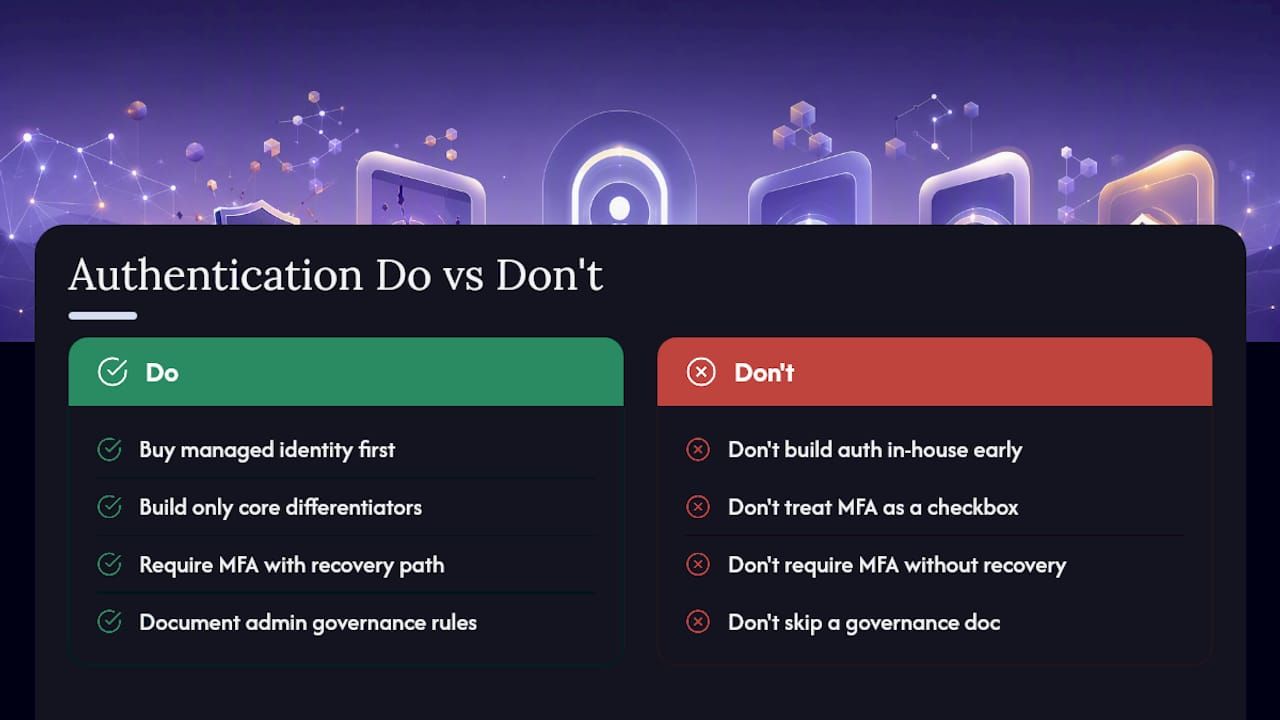
The clearest red flag I watch for is a team treating MFA as a checkbox rather than a workflow. Turning on MFA without a tested recovery path is how startups end up locking out their own paying customers, then scrambling through support tickets to manually unlock them. If you can’t answer “what happens when someone loses their phone” in one sentence, you’re not ready to require MFA broadly.
Governance doesn’t need to be heavy to work. A short internal doc listing who can grant admin roles, how often access gets reviewed, and where auth events get logged prevents most of the drift that turns a clean system into an audit nightmare eighteen months later. None of this requires a security team. It requires someone writing it down before the team grows past the size where everyone just knows the rules by memory.
— Jorge Del Carpio
Reading about passkeys, RBAC, and token rotation is one thing. Shipping them correctly, on a deadline, while also building the rest of your product, is another. Kreante works as the build partner for startups that would rather have working authentication in weeks than a half-finished internal project competing for engineering time.
A typical engagement starts with a short consulting pass to map where identity risk actually lives in your product, moves into a working prototype in a matter of weeks using Kreante’s LowCode and AI tooling, and ends with a full build plus handover training so your own team owns the code and the knowledge going forward. That’s true whether you need a passwordless signup flow for a consumer app or SSO and audit trails to close an enterprise deal. Explore Kreante’s AI solutions development services to scope what an authentication build would look like for your product, and get a timeline before you commit engineering hours to it yourself.
The four common factors are something you know (a password or PIN), something you have (a device, hardware key, or authenticator app), something you are (biometrics like a fingerprint or face scan), and somewhere you are (location or network-based checks). Modern authentication for startups usually combines at least two of these, most often possession and biometrics through passkeys.
Funding and authentication decisions are separate tracks, but investors evaluating a B2B product increasingly ask about security posture during diligence, so having passwordless login, basic RBAC, and logging in place before a fundraise removes a friction point. Beyond that, funding paths (angel, seed venture capital, accelerators) don’t depend on your specific auth stack.
Yes. A SaaS company is a startup as long as it’s early-stage, scaling a repeatable business model, and often still iterating on product-market fit, regardless of whether it sells to consumers or businesses. Authentication needs typically escalate faster for B2B SaaS startups because business buyers ask for SSO and audit trails earlier than consumer users do.
Several identity providers offer free or heavily discounted tiers aimed at early-stage companies, and some, like Auth0’s startup program, include a free year of service for qualifying new companies. Free tiers typically suffice for an MVP but come with limits on monthly active users or advanced features like SSO that you’ll hit once you scale.
Buy first for the vast majority of startups. Managed identity providers have already solved passwordless flows, MFA, and session security to standards like FIDO2 that would take a small engineering team months to replicate, and building in-house only makes sense once authentication itself becomes a genuine product differentiator.
Go further
Don't let your tech watch stop here. Explore our other resources to master your technology stack.
ToolsLearn how to build a mobile app MVP that effectively validates your core idea, ensuring you gather valuable user data without overspending.
 Tools
ToolsUnlock the secrets of effective internal tools development in 2026. Learn when to build or buy tools for your team's success.
 Tools
ToolsDiscover when content moderation AI excels and when it falters. Learn how automation enhances spam detection while lacking in nuanced judgments.