
 Tools
ToolsWhen AI Content Moderation Works and When It Fails
Discover when content moderation AI excels and when it falters. Learn how automation enhances spam detection while lacking in nuanced judgments.
JorgeAugust 26, 2026Read the article
Unlock the secrets of effective internal tools development in 2026. Learn when to build or buy tools for your team's success.

An internal tool is any application your company builds for its own people, not customers: admin dashboards, approval workflows, client portals, lookup utilities, automation agents. The decision heuristic is simple. Build deliberately when a workflow encodes something distinctive about how your business wins, and only after you can name an owner and a maintenance budget. Buy or configure when the workflow is standard across your industry. Engineering teams already burn an estimated 30 to 40 percent of their time on internal tooling and undifferentiated work, which is exactly why the cross-team workflow problems call matters more than most roadmaps admit. Providers like Kreante exist because most teams get this decision wrong in one direction or the other.
Three quick signals tell you which way to lean before you write a line of code or sign a contract:
TL;DR:
Internal tools should have a clear owner and an honest maintenance estimate before development begins to prevent creating liabilities.
Use a four-question test—workflow specificity, stability, integration cost, and ownership clarity—to decide whether to build or buy an internal tool.
Integration maintenance costs often outweigh initial build expenses, making it essential to account for wiring and ongoing updates in planning.
For simple or internal-only tools, no-code platforms work best, while complex logic or mission-critical systems require low-code or custom development.
Implement security controls such as SSO, RBAC, and audit logs from day one to prevent shadow IT and ensure governance compliance.
Internal tools fall into a handful of recognizable categories, and each one tends to belong to a different department by default.
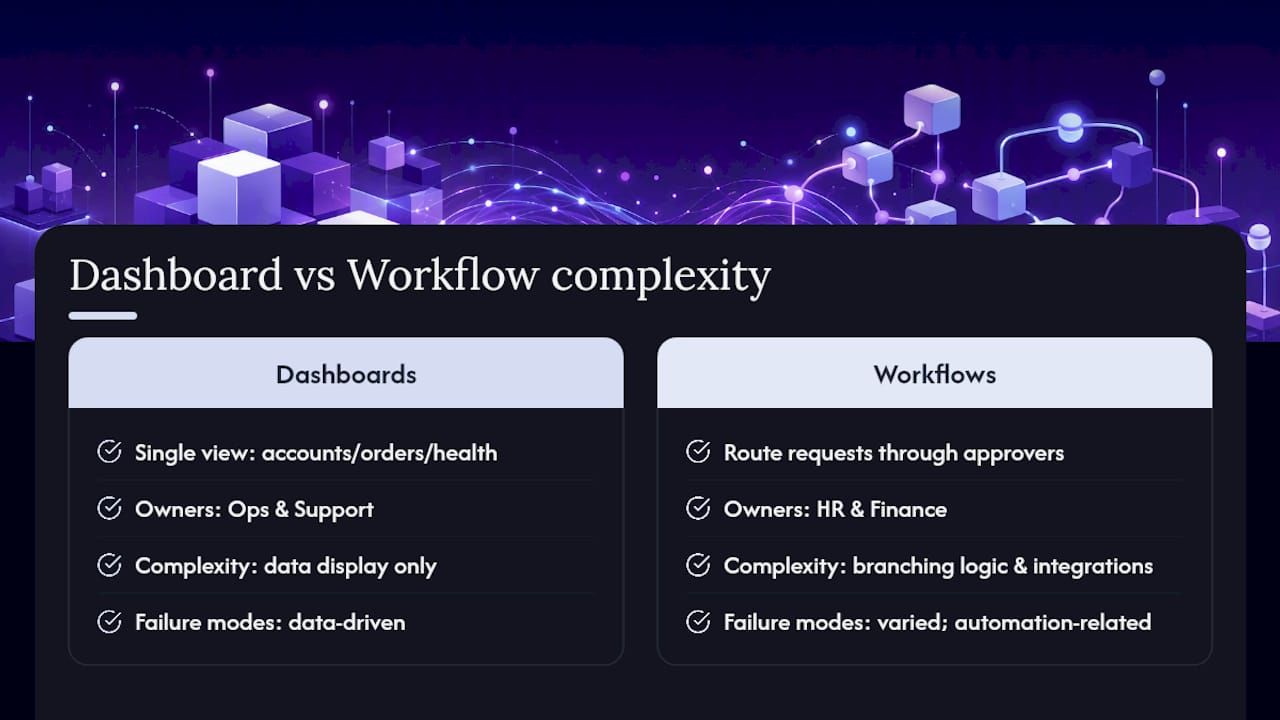
Admin dashboards give ops and support teams a single view into customer accounts, order status, or system health. A support lead who needs to see subscription status, ticket history, and refund eligibility on one screen instead of four is describing an admin dashboard. Ops usually owns these because they live and die by the data underneath them.
Client or partner portals hand outside parties limited, secured access to something they need on their own schedule. Think a contractor portal for submitting invoices or a franchisee dashboard for pulling sales reports. Finance and legal typically have opinions here because portals cross the boundary between “internal” and “external,” which raises the governance stakes.
Approval workflows route a request (a purchase order, a discount override, a time-off ask) through the right people in the right order. HR and finance own most of these, and they are a textbook build candidate the moment your approval chain has a quirk no off-the-shelf tool anticipates.
Lookup tools answer a narrow question fast: what’s this SKU’s current stock level, what’s this customer’s contract terms, what’s this employee’s certification status. Sales and support teams request these constantly, and they’re often the cheapest internal tools to build because the logic is thin.
Automation agents watch for a trigger and take action without a human clicking anything: reconciling a spreadsheet, routing a lead, flagging an anomaly in expense reports. These increasingly blend into AI agent territory, and 2026’s builders treat them as a distinct category from static dashboards because the failure modes are different.

The signal that separates a custom build from off-the-shelf configuration is usually branching logic. A dashboard that just displays data is a configuration problem. A workflow with five conditional approval paths, three integrations, and a compliance requirement is a development problem, whatever your no-code vendor’s sales deck implies.
The Build Deliberately approach rests on two preconditions that most teams skip: a named owner and a written maintenance estimate. Skip either one and you’ve built a liability, not a tool, no matter how clean the code is on launch day.
Run these four questions on any candidate workflow before committing resources:
A distribution company with a rebate calculation that involves 14 different customer tiers and three regional exceptions is a build candidate. Nobody sells that off the shelf, and the specificity is the whole point. A 20-person startup wanting a better way to track PTO requests is almost always a buy, because that problem has been solved a thousand times and their version of it isn’t actually different.
A mid-size logistics firm wanting a dashboard connecting four APIs, updated hourly, feeding into a scheduling algorithm, is a build. But it’s only a responsible build if someone owns the four upstream dependencies breaking silently on a Friday night.
Pro Tip: Run a 30-minute audit before scoping anything: list every external system the proposed tool would touch, then estimate one to two hours of monthly maintenance per integration point. If that math clears eight hours a month and nobody’s job description includes “own this,” you have your answer, and it’s not build.
No-code platforms let non-developers assemble an app from visual components, trading control for speed. Low-code platforms sit a layer down, giving developers scaffolding and prebuilt connectors while still allowing custom logic where needed. AI builders now sit alongside both, generating functional prototypes or even production code from a natural-language description of what you want.
The trade-offs are consistent across all three categories. You gain speed and you lower the bar for who can build something, which is real democratization. What you risk is governance gaps and vendor lock-in: an app assembled entirely inside a proprietary platform is hard to migrate if that vendor raises prices or sunsets a feature. Microsoft’s Power Platform is a useful reference point here, because it demonstrates that enterprise-grade low-code doesn’t have to mean weak governance. It ships with single sign-on, auditing, and deployment controls that plenty of smaller no-code tools skip entirely.
Gartner’s market reviews of enterprise low-code platforms show a maturity spectrum wide enough that “low-code” alone tells you almost nothing about whether a platform is enterprise-ready. That’s worth checking before you standardize a department on one.
Here’s a rough matrix for matching approach to workload:
Our guide to implementing no-code and low-code strategically goes deeper on governance patterns if you’re standardizing across an organization rather than picking one tool.
Five pieces of a custom internal tool determine whether it’s still useful in three years or a maintenance headache in six months.
The data layer (a Postgres database, or a managed layer like Supabase) needs a schema that reflects how your business actually thinks about the data, not a shortcut taken to hit a launch date. Auth and SSO should tie into your existing identity provider from day one; retrofitting single sign-on into a tool that launched with a separate login system is a painful, often-skipped project. The API or contract layer is where most long-term pain either gets prevented or gets baked in. The UI framework matters less than people assume, since most modern frameworks are interchangeable if the layers below are sound. The hosting and deploy model determines how painful updates are: a tool that requires a manual deploy process will get updated less often than it should, which quietly degrades its usefulness over time.
A short list of practices separates tools that age well from ones that don’t:
“Wiring” is the recurring cost nobody puts in the initial estimate: every integration point is a place where an upstream API changes and your tool breaks without warning. Total cost of ownership for internal software is dominated by this kind of maintenance, not the initial build. The practical mitigation is threefold: version your contracts so changes are visible instead of silent, monitor integration points actively rather than waiting for a user complaint, and keep a rollback plan ready so a bad deploy is a five-minute fix instead of a weekend.
Pro Tip: Before you approve a custom build, ask the engineering lead to name every external API or internal service the tool will call. If they can’t list them from memory, the wiring cost is being underestimated, and so is the maintenance budget.
An internal tool nobody uses is a sunk cost with a maintenance bill attached. Treating it like a product, with an owner, metrics, and a feedback loop, is what separates tools that get adopted from ones that get abandoned within a quarter.
Three roles make the difference. A product owner decides what gets built next and says no to feature requests that don’t serve the core job. An engineering steward keeps the tool healthy technically, patching dependencies and watching for integration breakage. A stakeholder panel, usually a handful of the tool’s heaviest users, gives ongoing feedback that a one-time launch survey never captures.
Track a small set of adoption metrics rather than a dashboard full of vanity numbers:
Operationally, a predictable release cadence beats sporadic big-bang updates, because users learn to expect and trust small changes rather than dreading a disruptive overhaul. Documentation that’s actually maintained (not written once at launch and abandoned) cuts support requests dramatically. And internal tools deserve some form of on-call coverage, even if it’s informal, because a broken approval workflow on a Friday afternoon can stall a company the same way a broken customer-facing feature does. Time lost switching between disconnected applications is exactly the tax a well-adopted internal tool is supposed to eliminate, and it only pays off if people actually open the tool instead of routing around it.
Shadow IT, meaning employees adopting unsanctioned apps because the sanctioned option is slow or missing, is one of the most common and least discussed risks in internal tooling. The fix isn’t stricter bans. It’s making the sanctioned path faster than the workaround.
A short list of controls belongs on every internal tool before it touches real data:
A sanctioned innovation space, meaning a governed environment where teams can prototype quickly without going fully outside IT’s visibility, is what actually reduces shadow IT in practice. People stop building rogue spreadsheet systems when the approved path is genuinely fast.
Before any internal tool goes live, run it past a short checklist: SSO connected, RBAC configured and tested, audit logging enabled, an owner named in writing, and a rollback plan documented. Skipping this checklist to save a week upfront is how a six-month-old internal tool becomes a security incident.
Kreante works in three stages, usually in order, because skipping straight to building is how most internal tool investments underperform.
Consulting comes first: an audit of where AI and custom tooling actually move a business number, resulting in a roadmap ordered by expected return rather than a slide deck of possibilities. Coaching follows for teams that want the capability to stay in-house: workshops and hands-on enablement so your team can maintain and extend what gets built, instead of depending on an outside vendor indefinitely. Build covers the actual development, web and mobile applications, AI agents, and automations, with a working prototype in weeks and your own code ownership at the end.
The teams that get the most value from an outside partner are the ones who know exactly what they don’t have in-house: a named technical owner, a fast enough path to a working prototype, or the ability to transfer real capability to their own staff rather than renting it indefinitely.
Bringing in a partner makes sense in three specific situations: nobody internally can own the maintenance burden, you need a working version fast enough to prove the return before committing further budget, or you specifically want your team trained up rather than replaced by a vendor relationship. Kreante’s DAVCO AI and Laboratoria+ projects reflect that build-and-transfer model in practice, with delivery paired with the coaching needed to keep the tool healthy after launch.
Turning a build-or-buy decision into a shipped tool follows a predictable sequence, and skipping steps is where most projects stall.
A tool is ready to launch when it has an assigned owner, monitoring in place, a documented rollback plan, and sign-off from security on access controls. Missing any of those four means it’s not minimum viable, it’s minimum risky.
Before committing to any vendor or internal team, ask three questions: what are the SLAs for uptime and support response, can we export our data and configuration if we leave, and who owns the code once the engagement ends.
Pro Tip: Get the answer to “who owns the code” in writing before the project starts, not after. It’s the single most common source of disputes once a tool is actually in daily use.
The most common failure in internal tools development isn’t bad code. It’s launching a tool with no named owner and no honest maintenance estimate, then being surprised six months later when it’s fragile and nobody wants to touch it. The fix is almost embarrassingly simple: it just requires someone to say the quiet part out loud before the build starts, not after it breaks.
Take your single most painful workflow this week and run it through the four-question framework: specificity, stability, integration cost, ownership. You’ll likely find the answer was obvious the whole time, and the project just never asked the question directly.
— Jorge Del Carpio
Kreante works as an outcomes-first partner across the full path: Consulting maps where a tool or AI agent actually pays off and hands you a roadmap ranked by expected return, Coaching trains your team to keep building AI-native after the engagement ends, and Build delivers a working prototype in weeks with your own code ownership at the end, not a vendor’s.
That sequence matters because it prevents the exact failure this article just walked through: tools built without an owner or a real cost estimate. If you’re staring at a workflow that might be a build candidate and you want a second opinion before committing budget, a short AI solutions conversation with Kreante can map the expected return before you write a single line of code. Book a discovery call and leave with a roadmap, not a guess.
Internal tools succeed when a named owner and an honest maintenance estimate exist before development starts, not after launch.
| Point | Details |
|---|---|
| Define before deciding | Internal tools include dashboards, portals, approval workflows, lookup tools, and automation agents. |
| Run the four-question test | Check workflow specificity, need stability, integration cost, and ownership clarity before building. |
| Count the wiring | Total cost of ownership is dominated by integration maintenance, not the initial build. |
| Match tool to approach | Simple CRUD favors no-code; mission-critical or complex logic favors low-code or custom development. |
| Govern from day one | SSO, RBAC, RLS, and audit logs prevent shadow IT and security gaps later. |
| Bring in outside help deliberately | Kreante’s Consulting, Coaching, and Build path fits teams needing a fast prototype or in-house capability transfer. |
Internal tools are applications built for a company’s own employees rather than customers, including admin dashboards, approval workflows, client portals, lookup utilities, and automation agents.
Common choices span custom stacks built on Postgres or Supabase with a modern UI framework, enterprise low-code platforms like Microsoft Power Apps, and AI-assisted builders for rapid prototyping.
Build when the workflow is specific to your business, stable, cheap to integrate, and has a named owner; buy or configure an existing tool when the workflow is standard across your industry.
Large technology companies build extensive internal tooling for engineering workflows, code review, and infrastructure management, though the specific names of most of these systems are not publicly listed.
Kreante runs a Consulting, Coaching, and Build sequence that maps expected return before development starts, then delivers a working prototype in weeks with the client retaining full code ownership.
Go further
Don't let your tech watch stop here. Explore our other resources to master your technology stack.
ToolsDiscover when content moderation AI excels and when it falters. Learn how automation enhances spam detection while lacking in nuanced judgments.
 Tools
ToolsDiscover an effective app growth strategy to boost user retention. Focus on optimizing listings, testing creatives, and improving onboarding.
 Tools
ToolsUnlock software success with a solid requirements document. This practical guide shows you how to create clear, testable specifications.