
 Tools
ToolsAI Coaching for Organizations: A Standards-Led Guide
Transform your organization with AI coaching by blending human expertise and innovative tools. Discover strategic steps for effective implementation.
KreanteAugust 13, 2026Read the article
Unlock efficiency with customer support automation. Reduce costs, enhance response times, and improve service quality with our practical guide.

Customer support automation uses software, AI, and workflow rules to handle support requests from receipt to resolution with minimal human intervention, cutting cost per ticket and response time while keeping quality consistent. If you have 30 minutes right now, run this audit: pull your last 90 days of ticket data, sort by volume, and flag every category where the question repeats, the answer is knowable from existing data, and a wrong answer carries low risk. These three criteria identify your first automation candidates faster than any vendor demo will.
The four core automation types you will be choosing between are self-service (knowledge bases, FAQ pages, status pages), conversational AI agents and chatbots, automated routing and triage, and agent-assist tools that surface answers and next steps for human agents. Most teams can test the first two in days, not months.
Quick wins you can ship this week:
A Gartner survey found that 91% of customer-service leaders feel pressure to implement AI in 2026. The pressure is real, but the leaders who get results start with a prioritized list, not a platform purchase.
Customer support automation delivers measurable ROI only when use cases are scored by impact and feasibility first, piloted with clear KPIs, and governed with conservative thresholds from day one.
| Point | Details |
|---|---|
| Start with the audit | Score ticket categories by volume, repeatability, and risk before choosing any tool or platform. |
| KB quality gates everything | A knowledge base refresh before any AI layer is the highest-ROI activity in the implementation. |
| Measure six KPIs from day one | Track deflection rate, cost per resolution, AHT, CSAT, FCR, and escalation rate from the first pilot interaction. |
| Governance prevents CX regressions | Set conservative confidence thresholds at launch and relax them in increments as accuracy is proven. |
| Kreante for scoped roadmaps | Kreante delivers prioritized automation roadmaps and working prototypes in weeks, with outcome-focused scoping before any build begins. |
Automation moves a support request through five stages without requiring a human at each one: ingest → classify → act → escalate → learn. Understanding each stage tells you where to plug in technology and where to keep a person in the loop.
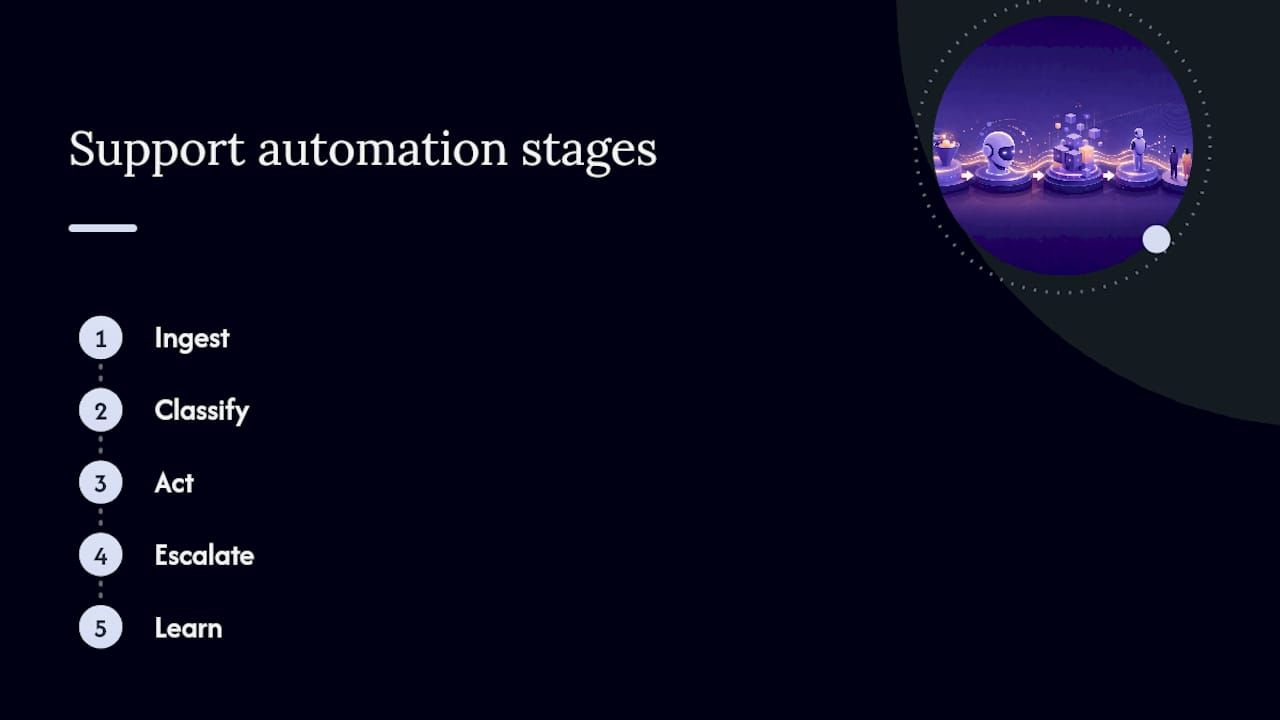
Ingest. A request arrives through any channel: email, chat widget, voice, SMS, social DM, or an in-app form. An integration layer (API, webhook, or native connector) captures it and normalizes it into a structured record.
Classify. Natural language processing (NLP) reads the text, detects intent (“where is my order?” vs. “I want a refund”), extracts entities (order number, product name, account ID), and assigns a confidence score. High-confidence classifications route automatically; low-confidence ones queue for human review.
Act. The orchestration engine checks the classified intent against a decision tree or AI policy. If the action is within scope (look up order status, send a password reset, apply a coupon), the system executes it. If it requires a knowledge base lookup, the engine retrieves the most relevant article and drafts a response.
Escalate. When confidence is low, the issue is sensitive, or the customer explicitly asks for a human, the system hands off to an agent with full context: conversation history, CRM data, and a suggested resolution. A clean escalation path is what separates a good automation from a frustrating one.
Learn. Every resolved ticket feeds back into the model. Thumbs-down ratings, escalation patterns, and resolution times flag where classification or response quality needs adjustment.
A useful mental model is three layers: frontline channels (where customers reach you) → automation and orchestration (where decisions are made) → backend systems (where data lives and actions execute). The orchestration layer is where most implementations stall, because it requires clean data contracts between the other two.
Pro Tip: The integration points that cause the most friction are identity mapping (matching a customer’s chat session to their CRM record), API rate limits on backend systems, and data-permission gaps that prevent the bot from reading order or account data. Solve these in discovery, before you build anything, or you will rebuild the integration twice. Workato’s support automation patterns document this as the most common cause of delayed pilots.
The business case for automated customer service rests on five outcomes, and they compound when you implement them in sequence rather than all at once.
Speed and availability. Customers get an answer in seconds at 2 AM on a Sunday. Microsoft’s global customer service research documents rising expectations for fast, always-on, multichannel support, and self-service as a preferred channel for straightforward queries. Automation is the only cost-effective way to meet that expectation without staffing three shifts.

Ticket deflection. A well-tuned knowledge base and chat agent can deflect a meaningful share of inbound volume before a ticket is ever created. Deflection rates vary widely by industry and KB quality; teams with mature self-service content often report 20–40% deflection, though your baseline will depend on how well your knowledge base covers actual ticket drivers. Track this as a ratio: tickets deflected divided by total contact attempts.
Lower cost per resolution. Automated resolutions cost a fraction of agent-handled ones. The exact ratio depends on your labor market and tooling costs, but the directional math is consistent: fewer agent-minutes per resolved issue means lower unit cost, and that gap widens as volume scales.
Consistent answers. Agents give different answers on different days. Automation gives the same answer every time, which matters for compliance-sensitive topics (returns policy, warranty terms, billing disputes) and for CSAT scores that correlate with perceived fairness.
Agent experience. Removing repetitive, low-complexity tickets from an agent’s queue is one of the fastest ways to reduce burnout and attrition. Agents who spend their time on genuinely complex cases report higher job satisfaction, and that shows up in quality scores.

Benefits by stakeholder:
| Stakeholder | Primary benefit | KPI it moves |
|---|---|---|
| Customers | Faster resolution, always-on access | CSAT, first-contact resolution |
| Agents | Less repetitive work, better tools | AHT, agent satisfaction |
| Support leaders | Predictable staffing, data-driven QA | Cost per resolution, escalation rate |
| Finance | Lower headcount growth as volume scales | Cost per ticket, support-to-revenue ratio |
Gartner predicts that agentic AI could autonomously resolve up to 80% of common customer-service issues by 2029. That level is still years away for most organizations, but it sets the direction: the teams building data readiness and automation infrastructure now will capture that upside first.
These examples map to common support workflows and range from same-week deployments to multi-month builds. Priority labels reflect typical effort-to-impact ratios, not universal rules.
Cross-channel example: A customer emails about a delayed order. The email parser creates a ticket, the NLP engine classifies it as “order status,” the system queries the OMS and sends an automated reply with the updated delivery estimate. If the customer then opens the chat widget and asks a follow-up, the chat agent pulls the same ticket context and continues the conversation without asking for the order number again. That handoff, email to ticket to chat, requires a shared customer identity layer and a single conversation record. It is achievable in a pilot; it just needs to be designed deliberately.
The sequence that works consistently is: discover → prioritize → prototype → measure → scale. Skipping discovery to go straight to platform selection is the single most common reason pilots fail.
Who: Support operations lead, IT/engineering, a data analyst.
Output: A ticket taxonomy, volume by category, and a list of candidate automations scored by frequency, repeatability, and business value.
Run the 30-minute audit from the opening section at scale here. Pull 90 days of tickets, categorize them, and score each category on three axes: volume (how many per month?), repeatability (does the same answer work every time?), and risk (what happens if the automation is wrong?). High volume + high repeatability + low risk = automate first.
Check KB coverage against your top 20 ticket types. Identify gaps. Assess CRM and OMS data quality: can the system reliably match a customer identity across channels? This step surfaces integration blockers before they delay a build.
Build vs. buy guidance:
Scope the pilot to one ticket category, one channel, and one automation type. Track:
Minimum sample: 200 automated interactions before drawing conclusions. Success threshold: deflection rate above your pre-set target AND CSAT no worse than baseline.
Agents need to understand what the automation does, when it escalates to them, and how to correct it when it is wrong. Three things that make adoption stick:
Before go-live, confirm:
Once the pilot hits its success thresholds, expand to additional ticket categories, then additional channels. Add agent-assist in parallel. Revisit the prioritization matrix quarterly as ticket mix and product changes shift the automation opportunity.
For a deeper look at the organizational side of AI adoption, implementing AI in a business covers the change-management and governance steps that apply across functions.
The main risk is not that automation fails to work. It is that it works just well enough to ship, then quietly degrades customer experience at scale. Governance is what catches that before customers do.
Common failure modes:
Governance checklist:
Pro Tip: Set your automation confidence thresholds conservatively at launch. A threshold of 0.85 means the system only acts autonomously when it is highly confident; everything below goes to an agent. As you accumulate data and validate accuracy, lower the threshold in 0.05 increments. Teams that launch with aggressive thresholds to hit deflection targets fast tend to generate a wave of bad automated responses that takes months to recover from in CSAT scores.
Automation that cannot be measured cannot be justified, and it cannot be improved. Six KPIs directly tie to ROI; track all of them from day one of your pilot.
| KPI | Definition | Formula | Cadence | Target signal |
|---|---|---|---|---|
| Ticket deflection rate | Share of contact attempts resolved without a human agent | Deflected contacts ÷ total contact attempts | Weekly | Rising trend; absolute target depends on ticket mix |
| Cost per resolution | Fully loaded cost to resolve one ticket | Total support cost ÷ total resolved tickets | Monthly | Declining as automation share grows |
| Average handle time (AHT) | Mean time an agent spends on a ticket | Total agent handle time ÷ agent-handled tickets | Weekly | Declining for categories with agent-assist |
| CSAT | Customer satisfaction with the support interaction | Survey score average (typically 1–5 or 1–10) | Per-ticket and monthly | No worse than pre-automation baseline; ideally improving |
| First-contact resolution (FCR) | Share of issues resolved on the first interaction | FCR tickets ÷ total tickets | Weekly | Increasing; automation should not lower FCR |
| Escalation rate | Share of automated interactions handed to a human | Escalated interactions ÷ total automated interactions | Daily in pilot, weekly in production | Declining as model improves; a spike signals a problem |
Day-1 dashboard: deflection rate, escalation rate, error/false-positive rate, CSAT by channel.
Month-3 dashboard: add cost per resolution, FCR trend, AHT by ticket category, and a breakdown of deflection by automation type (self-service vs. chat agent vs. agent-assist).
Interpreting early variance: in the first two weeks of a pilot, variance is high because sample sizes are small. Do not make model changes based on fewer than 200 interactions. If CSAT drops sharply in week one, check escalation path quality before adjusting the model; the problem is usually a broken handoff, not a bad classification.
A resilient stack combines four layers: channels, orchestration, knowledge, and backend connectors. You do not need all of them on day one, but you need to know where each will live before you start building.
Minimal pilot stack:
Enterprise orchestration stack adds:
Integration checklist before you build:
G2 user reviews consistently flag integration effort as the primary cost driver in automation projects. Choosing an orchestration platform that handles identity mapping and rate-limit management natively reduces that cost significantly over a point-tool approach.
For teams exploring no-code prototyping, building AI agents with Bubble shows how quickly a working agent can be assembled before committing to a full build.
Score every candidate automation on two axes before you commit resources: business impact (ticket volume × cost per ticket × resolution improvement) and feasibility (data readiness, API availability, team capacity, regulatory constraints). Multiply the two scores to get a priority rank. High impact + high feasibility = start now. High impact + low feasibility = invest in the prerequisites. Low impact + high feasibility = nice-to-have, not a priority.
Three tiers of automation complexity:
Sample 16-week timeline:
| Phase | Weeks | Key activities | Expected KPI signal |
|---|---|---|---|
| Discovery | 1–2 | Ticket audit, data assessment, use-case scoring | Prioritized backlog |
| Prototype | 3–6 | Build entry-level automations, KB refresh, pilot chat agent | First deflection data |
| Pilot | 7–12 | Run pilot on one category, monitor KPIs, iterate | Deflection rate, CSAT delta |
| Scale | 13 | Expand to additional categories and channels, add agent-assist | Cost per resolution trend |
Kreante has delivered AI solutions across 265+ projects in 35 countries, with working prototypes typically ready in weeks rather than months. The approach starts from the business outcome you want (fewer manual hours, lower cost per ticket, faster resolution) and works backward to the smallest system that gets you there. For a project like the DAVCO AI implementation, that meant a prototype in the hands of the operations team before a full build was commissioned, which de-risked the investment and validated the ROI case early.
If you want a prioritized roadmap for your specific ticket mix and stack, that is exactly the kind of scoping Kreante does in a consulting engagement before any code is written.
The teams that get real results from automated customer service share one habit: they treat the knowledge base as a product, not a document repository. The AI is only as good as the content it draws from. A bot trained on a KB full of outdated articles, inconsistent terminology, and missing edge cases will produce exactly the kind of confident-but-wrong answers that destroy CSAT. Before you invest in any AI layer, spend two weeks on KB quality. It is the highest-ROI activity in the entire implementation.
The second thing most leaders underestimate is escalation design. The moment a customer needs a human and the bot cannot get them there cleanly, every second of automation goodwill evaporates. The escalation path needs to be faster and smoother than just calling in. That means full context transfer, no re-authentication, and an agent who picks up knowing what the bot already tried.
One more thing worth saying plainly: start with agent-assist, not full automation, if your team is skeptical. Agents who see the tool making their job easier become advocates. Agents who feel replaced by a bot that makes mistakes become saboteurs. The adoption path matters as much as the technology path.
Most support automation projects stall not because the technology is wrong but because the roadmap, the data, and the integrations were never properly scoped. Kreante works differently: we start with a consulting engagement that maps your ticket mix, scores your automation candidates by ROI, and hands you a prioritized plan with an expected return per initiative, not a slide deck of possibilities.
From there, the path is fast and low-risk. A working prototype in 30–60 days, built with your stack and your data, so you can validate deflection rates and CSAT impact before committing to a full build. We handle the integrations, the agent training, and the governance setup. You own the code outright. Our team stays after launch to monitor KPIs and iterate.
If you are ready to move from audit to action, request a roadmap scoping session and we will show you exactly where automation pays off in your operation.
Support automation uses software rules, AI, and workflow engines to handle customer requests from receipt to resolution with minimal human involvement, reducing response time and cost per ticket.
Start by auditing your ticket volume to find high-frequency, repeatable categories, then deploy self-service content, automated routing, and AI agents for those categories first, while keeping humans in the loop for complex or sensitive cases.
Customer experience automation extends support automation to proactive touchpoints: triggered notifications, personalized onboarding flows, and post-resolution follow-ups that shape the full customer journey, not just reactive support interactions.
NLP-powered chatbots and AI agents handle intent detection and response; workflow orchestration engines sequence actions across systems; and CRM or helpdesk integrations (via APIs and webhooks) connect the automation layer to customer data and backend transactions.
Kreante starts with a consulting engagement to score automation candidates by ROI, then delivers a working prototype in 30–60 days using your existing stack, with full code ownership and post-launch support included.
Go further
Don't let your tech watch stop here. Explore our other resources to master your technology stack.
ToolsTransform your organization with AI coaching by blending human expertise and innovative tools. Discover strategic steps for effective implementation.
 Tools
ToolsCompare Chargebee, Recurly, Stripe Billing, Zuora and Maxio, and pick the subscription billing platform that fits your biggest operational risk.
 Tools
ToolsImplementing AI in a business requires a practical roadmap that addresses real operational challenges. This article presents 25 actionable strategies informed by experts in the field, covering everything from marketing automation.