
 Tools
ToolsDocument Processing Automation: An ROI-First Guide
Discover how document processing automation can streamline your operations, enhance accuracy, and deliver a prototype in just weeks.
JorgeAugust 18, 2026Read the article
Discover effective SaaS pricing models tailored for founders and product managers. Learn how to optimize revenue based on your product's needs.

If you’re building a collaboration tool, start with per-user pricing. If you sell an API or infrastructure product, start with usage-based or hybrid pricing. If your product has clear feature tiers that map to different buyer types, use tiered pricing. If you’re chasing viral, bottom-up adoption in a consumer-adjacent market, freemium is your entry point. Everything else is refinement.
That’s the one-sentence version. The longer version is that most SaaS companies pick a pricing model by copying a competitor, then spend two years unwinding the mess. The model determines how your revenue behaves under growth, how sales conversations go, and whether your finance team can forecast next quarter with any confidence.
Here’s how that verdict breaks down by scenario:
Your first move this week should be small. If you’re on flat-rate pricing and suspect you’re leaving money on the table, add a usage meter to your highest-value action (API calls, seats added, storage consumed) and watch it for 30 days before changing a single price. Data first, pricing changes second.
The right SaaS pricing model matches your value metric to how customers actually derive value, and it only works if billing infrastructure can execute it accurately.
| Point | Details |
|---|---|
| Match model to value metric | Per-user fits collaboration tools, usage-based fits APIs, tiered fits multi-segment products. |
| Limit tiers to two to four | More options create decision paralysis and slow down self-serve conversion. |
| Instrument before you bill | Track usage and cohort data before changing prices, not after. |
| Hybrid needs real infrastructure | Base-plus-usage pricing requires automated metering, proration, and overage alerts. |
| Kreante builds the billing layer | Kreante runs short pricing sprints that pair a tested hypothesis with working billing integration. |
A SaaS product is licensed access to software hosted and maintained by the provider rather than something a customer buys once and owns, as Microsoft Azure’s definition lays out. That distinction changes the entire pricing calculus. You’re not selling a transaction. You’re selling a relationship that has to survive monthly renewal decisions, and every dollar of revenue depends on retention math instead of a single close.
This is why SaaS pricing strategies orbit around a different set of numbers than traditional retail: monthly recurring revenue (MRR), annual recurring revenue (ARR), and customer lifetime value (LTV). A subscription pricing model isn’t just a price tag. It’s a mechanism that either compounds revenue through expansion or bleeds it through churn, month over month, for as long as the customer stays.
Three metrics tell you almost everything about whether your pricing model is working:
Pricing models and pricing strategy aren’t the same thing, and conflating them is where most founders go wrong. A model is the billing framework (per-seat, usage, tiered). Strategy is the research that decides what to charge and who to charge it to, a distinction Paddle draws clearly. You can have the right model and still lose money with the wrong strategy layered on top.
Here’s the full reference. Each model below gets a plain-language definition, a real example, the honest pros and cons, and the implementation details that actually matter when you sit down to build the billing logic.
One price, one set of features, no tiers. The customer pays a fixed monthly fee and gets the entire product.
Pros: dead simple to sell, easy to forecast revenue, no sales friction from confusing tier comparisons.
Cons: no expansion path for existing customers, no segmentation between a solo user and a 500-person company, and you leave enterprise money on the table.
Implementation tips: flat-rate works best for narrow, single-use tools with one buyer persona. If you notice large customers using the product dramatically more than small ones and paying the same amount, that’s your signal to move toward tiered or usage-based pricing before churn creeps in from oversized accounts feeling shortchanged.
Multiple pricing tiers (usually Starter, Growth, Enterprise or similar) bundle different feature sets and usage limits at different price points. This is one of the most common tiered pricing examples in the market, and for good reason: it lets you serve a solo freelancer and a 200-person marketing team from the same product without either feeling like they’re overpaying or underserved.
Pros: natural upgrade path, segments customers by willingness to pay, gives sales teams a menu to work from.
Cons: too many tiers create decision paralysis, and misaligned tiers push customers into the wrong bucket, which either caps your revenue or causes churn when they feel stuck.
Keep the tier count to two to four, with each tier carrying a one-sentence value proposition a buyer can grasp in five seconds, a principle Stripe’s pricing and packaging guide backs with real packaging data. Upgrade triggers should be discreet and tied to a specific usage threshold or feature gate, not a vague “contact sales” wall that stalls momentum.
Implementation tips: map each tier to an actual customer segment you’ve interviewed, not a guess. Build proration logic before launch, because customers upgrading mid-cycle expect the billing math to just work.
You charge per named user or per login. Slack and most project management tools built their early growth on this model.
Pros: revenue scales predictably with team size, easy for buyers to budget, works well when value genuinely correlates with headcount.
Cons: it punishes companies for adding users even when those users barely touch the product, and it creates incentive for customers to share logins to avoid paying more.
Implementation tips: define “user” precisely in your terms (named seat vs. concurrent login) before your first enterprise contract, because this ambiguity causes more billing disputes than almost anything else in SaaS. Build a seat reconciliation process into onboarding so admins aren’t surprised by an invoice that jumped because five new hires got accounts.
A variant of seat pricing where you only bill for users who actually logged in or performed an action during the billing period, rather than every provisioned account.
Pros: feels fairer to customers, reduces the “we’re paying for empty seats” objection that kills seat-based renewals, and tends to improve retention because customers don’t feel penalized for organizational churn.
Cons: revenue becomes less predictable month to month, and you need real usage tracking infrastructure to bill accurately.
Implementation tips: define “active” with a specific, auditable action (one login, one task completed) and disclose that definition clearly in your contract. Customers will ask, and vague definitions erode trust fast.
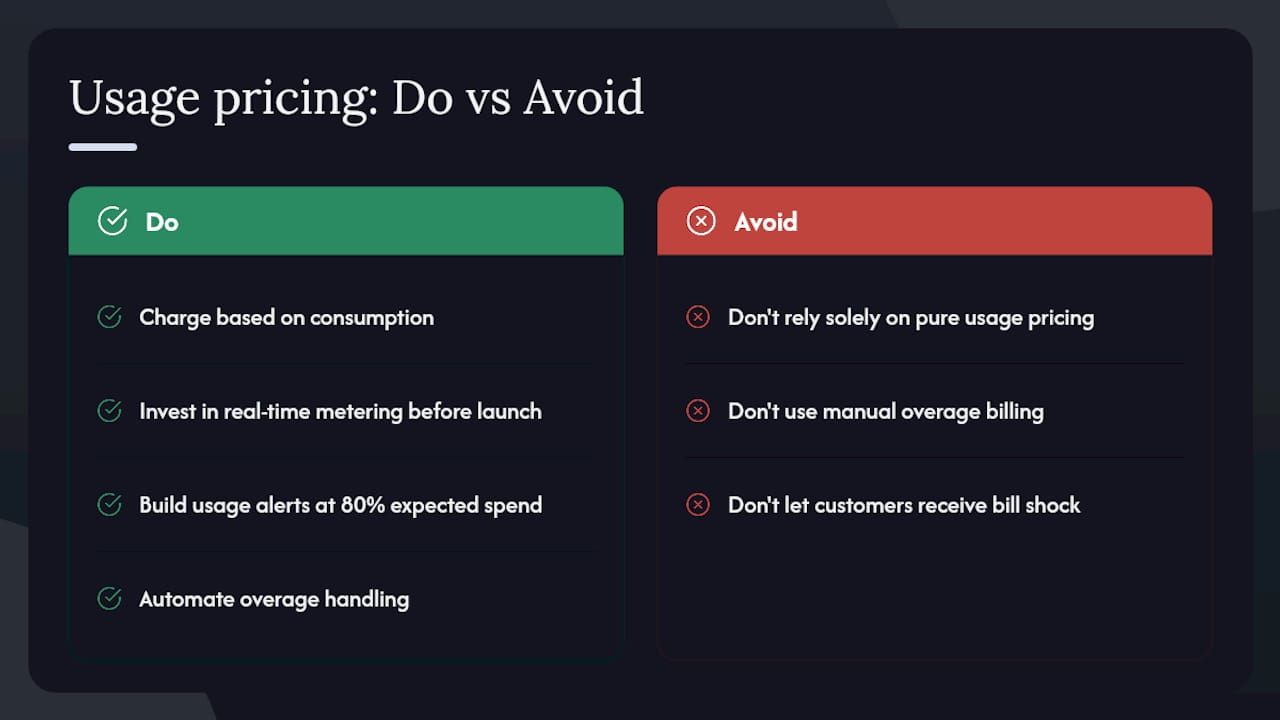
You charge based on consumption: API calls, gigabytes processed, messages sent, compute minutes used. Stripe itself runs largely on usage-based pricing for its payment processing, charging a percentage plus a fixed fee per transaction rather than a flat subscription. Algolia, the search infrastructure provider, prices largely on search requests and records indexed, which aligns cost directly with how much of the product a customer actually consumes.
Pros: revenue scales naturally with customer value and usage, removes the “am I overpaying for a feature I don’t use” objection entirely, and appeals strongly to usage-sensitive buyers like developers.
Cons: revenue becomes volatile and hard to forecast, customers can experience bill shock if usage spikes unexpectedly, and it can discourage adoption if customers fear an unpredictable invoice.
A Paddle analysis of pricing models notes that usage-based pricing suits consumption-driven products well but trades away the revenue predictability that tiered or per-seat models offer. Many companies solve this by adding a base fee or minimum commitment, which turns pure usage pricing into a de facto hybrid.
Implementation tips: invest in real-time metering before launch, not after. Build usage alerts that notify customers at 80% of their expected spend so nobody gets blindsided by an invoice. Overage handling needs to be automated; manual overage billing does not scale past your first fifty customers.
Customers pay separately for individual features or modules rather than bundled tiers. Salesforce uses this extensively, letting customers add modules like Sales Cloud, Service Cloud, or Marketing Cloud, then layering add-ons like advanced analytics or AI features (Einstein) on top for additional cost.
Pros: customers only pay for what they actually use, which reduces sticker shock on the base product and opens a long tail of upsell opportunities.
Cons: pricing pages become genuinely confusing, sales cycles lengthen because buyers need to configure exactly what they want, and customers frequently underbuy, then get frustrated when they hit a wall.
Implementation tips: bundle your most commonly co-purchased features into a default package and offer a-la-carte add-ons only for genuinely optional capabilities. Track which a-la-carte features get abandoned in configuration; that’s a signal the feature belongs in a base tier instead.
A free tier with limited functionality alongside paid tiers that unlock more. Wix built an entire business on this: anyone can build a basic website free, but real estate, custom domains, and advanced e-commerce features live behind a paywall.
Pros: removes the biggest barrier to trial, generates enormous top-of-funnel volume, and lets the product sell itself through word of mouth before a salesperson ever gets involved.
Cons: the vast majority of free users never convert, free-tier infrastructure and support costs money even when nobody pays, and a poorly designed free tier can cannibalize paid upgrades if it’s too generous.
According to Chargebee’s pricing models guide, freemium works best when the product’s value becomes obvious through usage itself, and when network effects or habit formation create a natural nudge toward the paywall.
Implementation tips: set free-tier limits around a genuine pain point, not an arbitrary number. The upgrade trigger should hit right when the customer has proven the product works for them, not before they’ve had a chance to feel that.
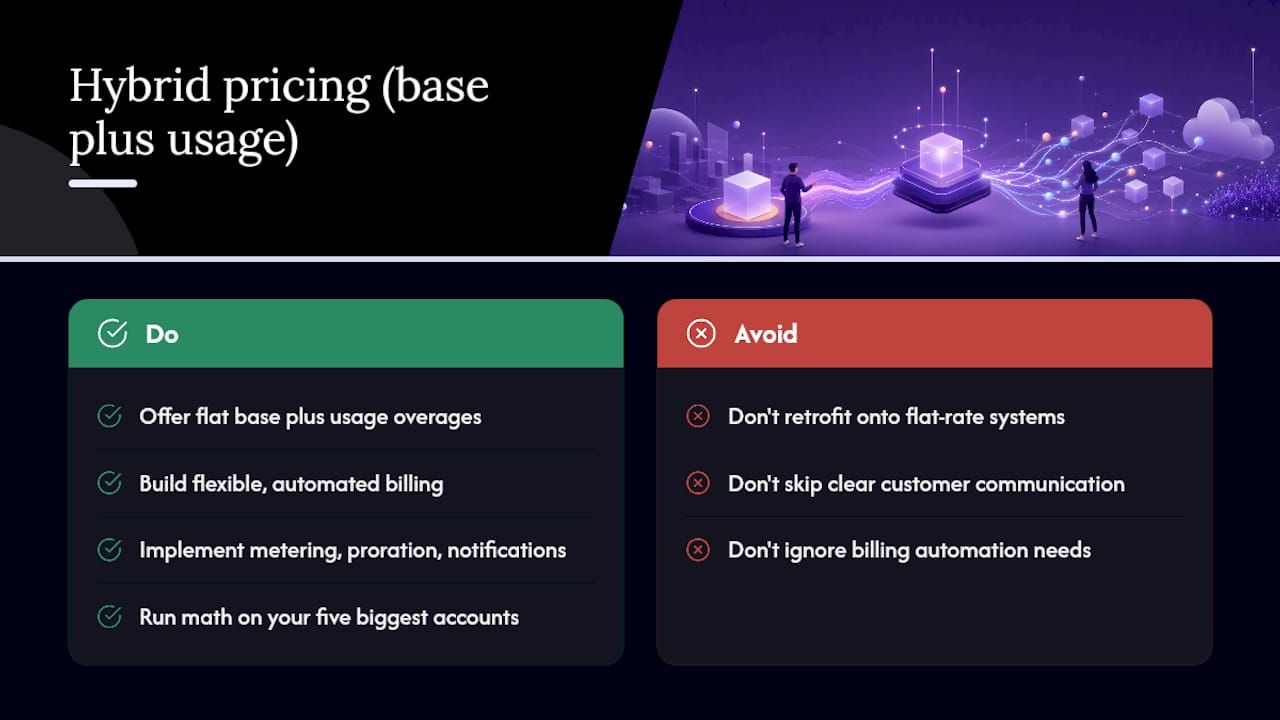
A flat base subscription combined with usage-based overage charges. This is quickly becoming the default recommendation for products with real expansion potential, because it stabilizes baseline revenue while still capturing upside from your best customers.
Pros: predictable minimum revenue per account, upside capture from heavy users, and it smooths out the volatility that pure usage pricing creates.
Cons: billing complexity goes up substantially, and customers need very clear communication about what’s included in the base versus what triggers overage charges.
Recurly’s research on subscription pricing strategies recommends hybrids specifically for businesses that need base-level predictability without sacrificing the ability to earn more from customers who get more value. The catch is billing infrastructure: hybrid models demand flexible, automated systems, or the overage rules turn into technical debt fast.
Implementation tips: metering, proration, and automated overage notifications need to be built into your billing stack from day one. Retrofitting hybrid logic onto a flat-rate billing system later is a multi-month engineering project, not a config change.
Pro Tip: Before you build hybrid billing, run the math on your five biggest accounts under the proposed model. If none of them would pay meaningfully more than today, the hybrid structure isn’t solving a real problem yet.
Price is set according to the quantifiable business outcome the product delivers (revenue generated, hours saved, risk avoided) rather than cost-plus or competitor benchmarking. PagerDuty prices its incident response platform partly around the cost of downtime it helps prevent, positioning its plans against the value of faster incident resolution rather than simply feature count.
Pros: captures the highest possible willingness to pay, aligns your revenue growth with genuine customer success, and gives sales teams a stronger ROI story.
Cons: requires deep customer research to quantify value accurately, and it’s hard to standardize into a self-serve pricing page.
Implementation tips: value-based pricing rarely works as your only model. Pair it with tiered or usage-based structures for smaller accounts, and reserve pure value-based conversations for enterprise deals where a sales team can build a custom ROI case.
Custom contracts negotiated directly with large accounts, typically involving annual commitments, volume discounts, and bespoke terms outside the standard pricing page.
Pros: captures maximum value from your largest accounts, allows custom terms that fit complex procurement processes, and often comes with multi-year commitments that stabilize revenue.
Cons: sales cycles stretch to months, it requires a dedicated enterprise sales motion, and pricing opacity can create internal friction when customers compare notes.
Implementation tips: even with negotiated pricing, anchor negotiations to a published list price. Fully opaque pricing slows every deal down because buyers lose the reference point they need to justify the purchase internally.
Run through this checklist before committing to a model:
The mapping below is a starting heuristic, not a rulebook. Treat it as the first hypothesis to test, not the final answer.
| Product Archetype | Recommended Model | Primary Value Metric |
|---|---|---|
| Team collaboration tool | Per-user or per-active-user | Active seats |
| API or developer infrastructure | Usage-based or hybrid | API calls, compute, or data volume |
| Feature-rich B2B platform | Tiered | Feature access tier |
| Consumer or prosumer app | Freemium | Free-to-paid conversion trigger |
| High-touch enterprise software | Value-based or negotiated | Business outcome delivered |
Before finalizing anything, ask your existing customers and your sales team directly: where do renewal conversations get tense over price? What usage or feature threshold makes a customer say “okay, I need to upgrade now”? Those answers reveal your real upgrade triggers, which matter more than any theoretical framework.
The safest rule for early-stage teams: start with the simplest model that captures your value metric honestly, instrument usage data heavily from day one even if you’re not billing on it yet, and plan a path toward hybrid pricing if you expect meaningful expansion revenue down the line. Starting simple and adding complexity as you learn is a pattern Recurly’s growth research confirms works better than launching with an overbuilt pricing model nobody asked for.
Packaging and pricing are one decision, not two. Design them together, because packaging determines the upgrade paths your pricing model depends on, a point Stripe’s packaging research makes explicit: misaligned packaging strands customers in the wrong plan, which either caps revenue or drives churn.
Pro Tip: Give every paid tier a “why upgrade” trigger tied to a specific number the customer can see in their own dashboard, not a marketing description. “You’ve used 90% of your API quota” converts far better than “Upgrade for more power.”
Pricing experiments fail most often because teams skip the hypothesis step and jump straight to changing numbers. Run it like a real experiment:
Track conversion rate, MRR per cohort, churn rate, expansion MRR, and NPS for every experiment. These are the same metrics Chargebee’s guide to SaaS pricing recommends watching, because they tell you not just whether the new price converts better, but whether it holds up over the following renewal cycle.
The most common failure is too many tiers. Five or six options on a pricing page doesn’t feel like flexibility to a buyer; it feels like homework, and confused buyers don’t buy. A close second: charging per seat when the product’s value doesn’t scale with headcount, which just breeds resentment and login-sharing.
Other frequent traps: launching usage-based pricing without metering infrastructure ready, and treating pricing as a “set it and forget it” decision instead of something to revisit as the product matures.
On the psychology side, a few tactics consistently move the needle:
Pro Tip: If your team is deadlocked on how many tiers to launch with, default to three. It’s the number that consistently avoids decision paralysis while still giving buyers room to self-segment.
Every pricing model decision eventually shows up in four places: acquisition cost, expansion revenue, churn, and cash flow timing. A model that looks elegant on a whiteboard but doesn’t move one of those four numbers isn’t worth shipping.
Kreante runs pricing work as a short, structured sprint rather than an open-ended consulting engagement:
One real pattern from this kind of work: a company moving from flat-rate to hybrid pricing (base fee plus usage) can stabilize baseline MRR through the fixed component while opening real expansion headroom from its highest-usage accounts, exactly the trade-off Stripe’s hybrid model research describes as the core benefit of that structure.
Founders overcomplicate pricing before they have enough customers to know what actually matters. Five tiers and three add-ons look sophisticated on a slide, but with twenty customers, you can’t tell which lever is working. The bigger miss is ignoring upgrade triggers entirely, launching one flat price and never building the instrumentation to see when a customer is ready to pay more. That data is worth more than any pricing model on paper.
Most founders don’t need another pricing framework. They need someone to build the metering, proration, and billing logic that makes the framework actually work, and that’s where a lot of pricing plans quietly die on the engineering backlog. Kreante runs a compact pricing and billing sprint that turns a pricing hypothesis into a working system: usage tracking, tiered billing logic, and overage handling wired into your product, not just sketched on a slide.
A typical engagement delivers two things fast: a pricing hypothesis backed by your actual cohort data, and an experiment design with the billing integration already built to support it, whether that means Stripe metering, seat reconciliation, or usage-based overage rules. If your team has the pricing model figured out but not the technical plumbing to bill on it accurately, that’s the gap worth closing first. Get in touch about AI-driven pricing and billing implementation and bring your current pricing page to the first conversation.
The main SaaS pricing models are flat-rate, tiered, per-user, per-active-user, usage-based, per-feature (a-la-carte), freemium, hybrid (base plus usage), value-based, and enterprise/negotiated pricing.
This isn’t a standard, widely documented pricing framework, and definitions vary depending on the source. Rather than relying on an informal rule, focus on the decision criteria that actually hold up: value metric, customer segment, and sales motion.
Pricing strategy generally breaks into cost-based, competitor-based, value-based, and penetration pricing, though in SaaS specifically, most companies blend value-based reasoning with tiered or usage-based billing models to execute that strategy.
A SaaS pricing model is the billing framework, such as per-user, usage-based, or tiered, that determines how a subscription business charges customers, separate from the pricing strategy that sets the actual price points and segments.
Switch when your highest-usage customers are clearly getting more value than your top tier captures. A base fee plus usage component, the structure behind hybrid pricing, lets you stabilize baseline revenue while capturing that expansion upside.
Go further
Don't let your tech watch stop here. Explore our other resources to master your technology stack.
ToolsDiscover how document processing automation can streamline your operations, enhance accuracy, and deliver a prototype in just weeks.
 Tools
ToolsUnlock efficiency with customer support automation. Reduce costs, enhance response times, and improve service quality with our practical guide.
 Tools
ToolsTransform your organization with AI coaching by blending human expertise and innovative tools. Discover strategic steps for effective implementation.